What Is a CDN? How Cached Content Delivery Works
On this page19 items
The previous pages covered registering a domain and resolving names with DNS. A visitor’s browser connects to the server at the IP address it looked up via DNS and receives the page data. But what happens if that server is on the other side of the world? Or what happens when a flood of visitors arrives all at once, like right after your site is featured on TV?
The answer to both problems is a CDN (Content Delivery Network). The CDN is the service Cloudflare started with, and it remains at the core today. This page covers the problems a CDN solves and how caching, its heart, works.
What you’ll learn on this page#
- The two main causes of slow websites (distance and server load)
- The basic structure of a CDN (origin servers and edge servers)
- How caching works (cache hits, cache misses, TTL)
- What gets cached and what doesn’t
- The characteristics of Cloudflare’s CDN, and where beginners tend to stumble
The problems of a world without CDNs#
Problem 1: Distance translates directly into speed#
Internet traffic can’t defy the laws of physics. Data travels through optical fiber at the speed of light, yet a round trip between Tokyo and New York (about 10,000 km) inevitably takes more than 0.1 seconds. And since displaying one page involves exchanging dozens of files, such as images, CSS and JavaScript, these round trips happen many times. Simply having a distant server makes pages visibly slower.
Problem 2: A single server has limits#
The server that hosts the actual website is called the origin server. Whether it’s a hosting plan, a NAS at home or a virtual machine in the cloud, its role is the same: it’s the origin server.
There’s a limit to how many visits a single origin server can handle. Even a blog that normally gets 1,000 visits a day might get 100,000 in an hour if it goes viral on social media. In a setup where every visitor connects directly to the origin server, such a surge can leave the server unable to respond, and your site goes down just when it’s getting attention.
What is a CDN?#
“Distribution centers” around the world take on the load#
A CDN places copies of your content on many servers around the world and delivers it from the server closest to each visitor. These distribution-center servers are called edge servers, because they sit at the edge of the network.
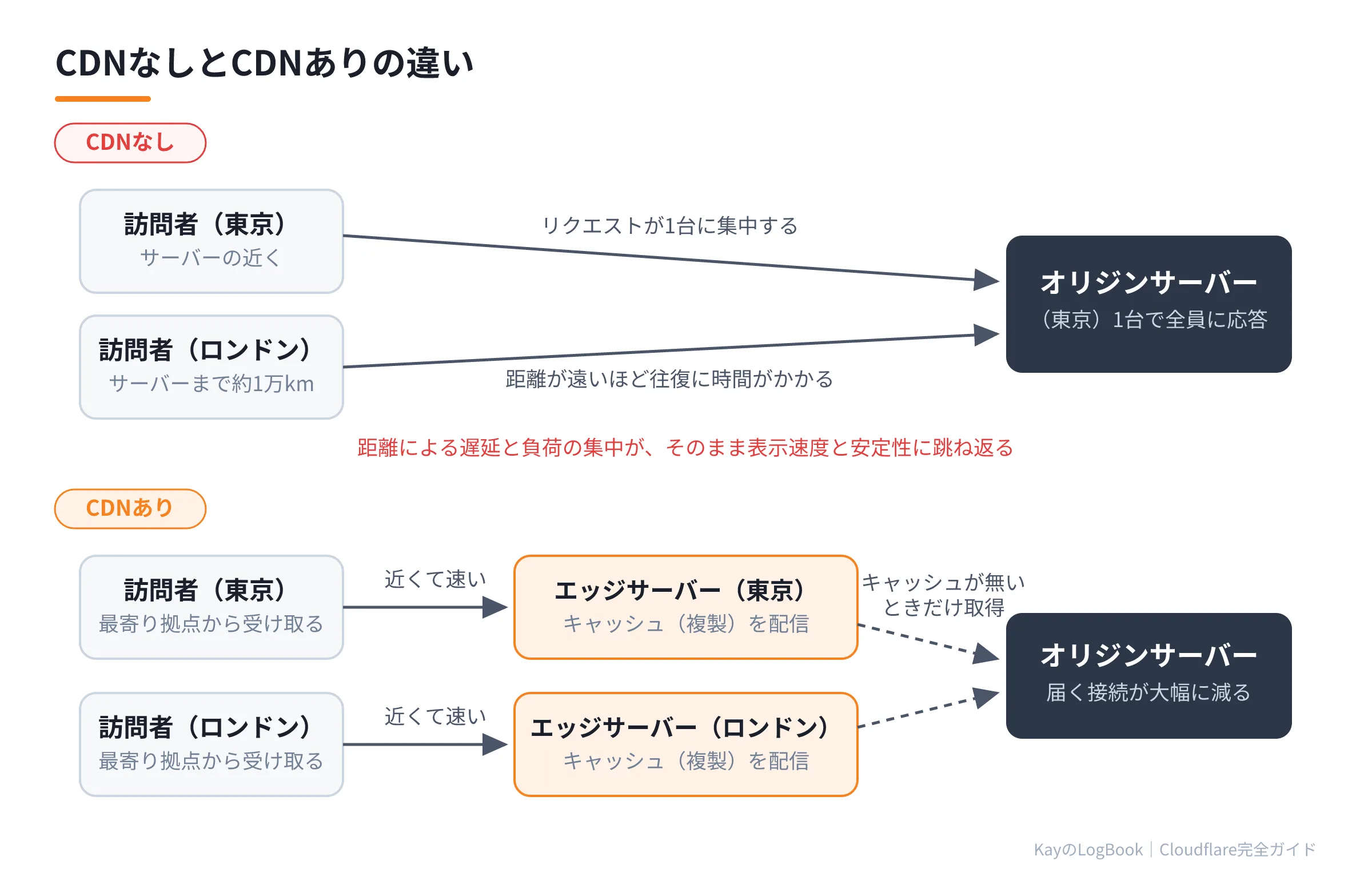
To use a delivery analogy, the origin server is the factory and the edge servers are regional distribution centers. Instead of shipping every order nationwide directly from the factory, popular items are stocked at regional distribution centers and delivered from there. Shorter distances mean faster delivery, and less burden on the factory.
Adding a CDN solves both of the problems above at once.
- The distance problem: Visitors in Tokyo are served by an edge server near Tokyo, and visitors in London by an edge server in London, which drastically shortens the physical distance
- The load problem: Edge servers take on most of the traffic, so connections to the origin server drop significantly. Even when visitors flood in, the load is spread across edge servers around the world
Cache: the edge server’s inventory#
The copy of content held by an edge server is called the cache, and storing a copy is called “caching.” Since the cache is the heart of a CDN, let’s follow how it works step by step.
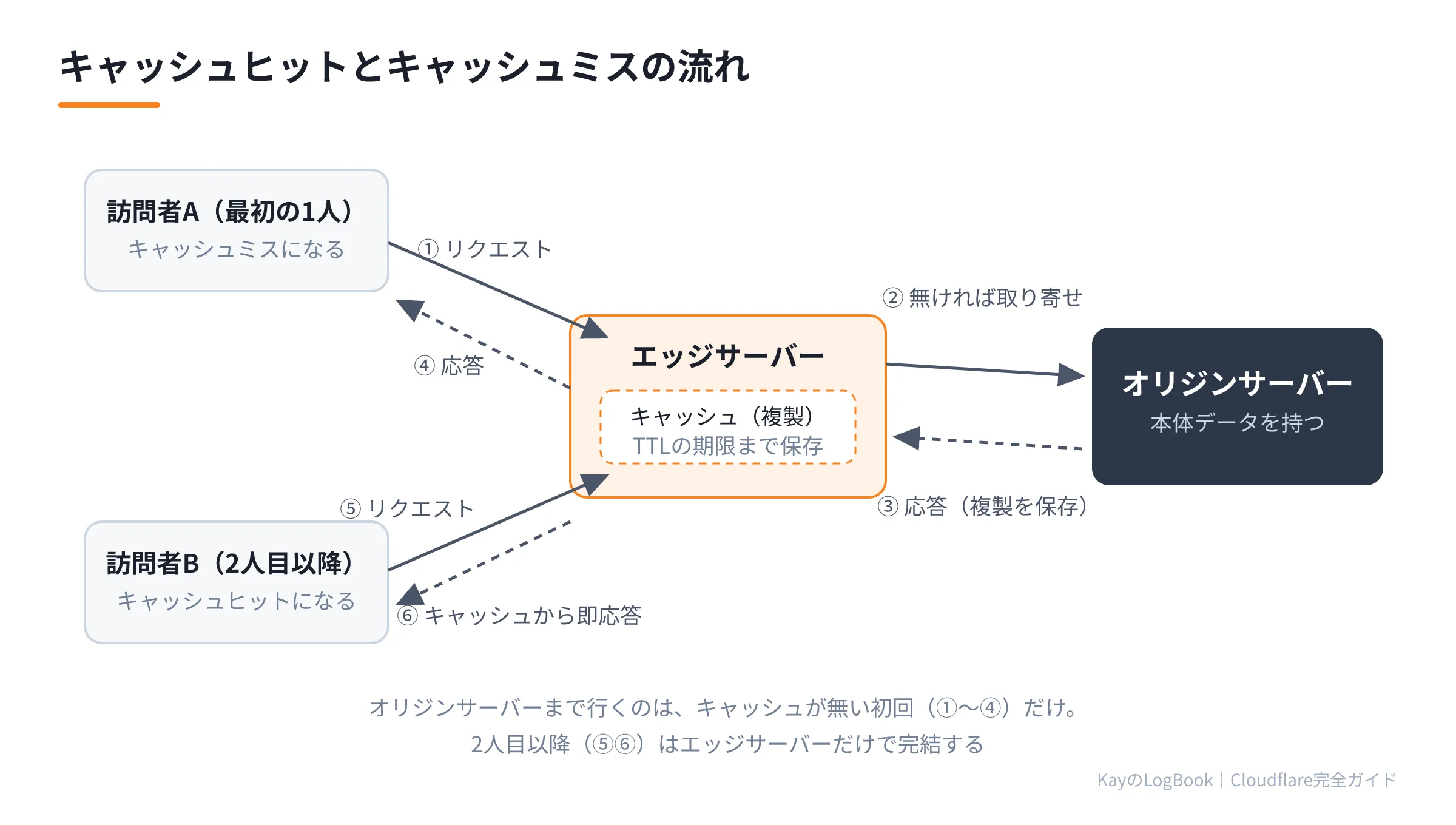
- A visitor requests a file (say, an image on a blog) from an edge server
- The edge server checks its cache. If it doesn’t have a copy yet (this is called a cache miss), it fetches the file from the origin server, stores a copy, and then responds to the visitor
- For subsequent visitors, it returns the stored copy as is (this is a cache hit). It doesn’t contact the origin server
In other words, only the very first visitor triggers a trip to the origin server; from the second visitor on, the edge server handles everything. The more traffic a site gets, the higher the proportion of cache hits (the cache hit ratio), and the bigger the CDN’s effect.
TTL: the cache’s expiration date#
If copies were served forever, replacing an image on the origin server would leave the old one showing indefinitely. So caches are given an expiration time. This is called TTL (Time To Live), which also appeared on the DNS page. Expired cache entries are discarded, and a fresh copy is fetched from the origin server on the next request.
TTL is basically controlled by an instruction called Cache-Control (an HTTP header) that the origin server attaches to its responses. You can give per-file instructions such as “this may be cached for a year” or “never cache this.” It can also be overridden in the CDN’s settings.
What gets cached?#
Static content and dynamic content#
A cache can only be used for “things that are the same no matter who receives them.” From this perspective, content falls into two types.
- Static content: Files that are the same whoever views them and whenever, such as images, CSS, JavaScript, fonts, videos and PDFs. They’re well suited to caching
- Dynamic content: Things whose contents change depending on the person or situation, such as an account page after login, a shopping cart, or search results. These must not be cached as is. If a cached copy of someone else’s account page were served, it would be a serious data leak
By default, Cloudflare “doesn’t cache HTML”#
By default, Cloudflare caches static files based on their file extensions (about 70 types, including images, CSS and JavaScript). On the other hand, it doesn’t cache the HTML of the page itself by default. HTML is often dynamic content generated by a program like WordPress, and caching it carelessly could lead to accidents like the one above.
So right after you enable Cloudflare, the behavior is: “the parts that make up a page (images and so on) get faster through edge delivery, but the HTML itself is generated by the origin server every time.” There are ways to cache HTML too for more speed (Cache Rules and APO), but they’re advanced settings that require you to identify dynamic content first.
How to use the CDN on Cloudflare#
Characteristics: free, unlimited bandwidth, almost no setup#
Cloudflare’s CDN has the following characteristics.
- Available on all plans, with unlimited delivery volume (bandwidth): Even on the Free plan, there are no extra charges or suspensions based on data transfer. Structurally never having to worry about “extra charges because image transfer was high this month” is unusual among CDN services
- Edge servers in more than 330 cities worldwide (as of August 2026): There are multiple locations in Japan, and visitors in Japan are served by edge servers in Japan
- Almost no setup: Just switch your nameservers to Cloudflare and enable the proxy on your DNS records (the orange cloud icon), and cached delivery of static files begins. The next page explains how this proxy works in detail
Clearing the cache (purging)#
If old content keeps showing after you update your site, you can manually delete the cache. This is called purging. You can do it from the Cloudflare dashboard either per URL or for everything at once, and it takes effect within seconds. There’s also Development Mode, which temporarily suspends caching while you’re working on your site.
Example: adding Cloudflare to a blog#
Consider a personal blog with 3,000 page views a day. If each page has an average of 30 files such as images and CSS, that’s about 90,000 file requests per day.
Without a CDN, the hosting server (the origin server) handles all 90,000 requests. With Cloudflare, most static files are served from the edge servers’ caches, so requests reaching the origin server drop to roughly the 3,000 for HTML generation plus cache misses. Visitors experience faster pages, and at the same time you gain headroom under your hosting plan’s limits. For sites with visitors from abroad, the benefit of shorter distances is even more pronounced.
Points for beginners to watch#
- The prime suspect for “my update isn’t showing” is the cache: If you can’t see changes to your site after adding a CDN, suspect the cache first and run a purge. Development Mode makes things more comfortable while you work. Note that the browser’s own cache is a separate layer, so if purging doesn’t fix it, try a hard reload in your browser too
- Don’t cache dynamic pages indiscriminately: Carelessly setting something like “cache everything” with Cache Rules could lead to accidents where logged-in pages become visible to others. Understand that not caching HTML by default is a design that errs on the side of safety
- A CDN alone won’t make “everything fast”: By default, HTML is generated by the origin server every time, so on sites with slow server-side processing, the time until the page starts to display remains. It’s important to separate out where the CDN is actually having an effect
- Caches are independent per location: Even if the Tokyo edge server has a cached copy, the first request at the Osaka location will be a cache miss. This is one reason you might feel “I’ve visited it once, but it’s not faster”
Related services#
- Cache Rules: A rules feature for finely controlling which URLs are cached and for how long
- APO (Automatic Platform Optimization): A paid option that safely caches even the HTML of WordPress sites. Covered in a later hands-on page
- Argo Smart Routing: A paid option that optimizes the route between edge servers and the origin server
- Cache Reserve: A paid option that stores the cache long-term to raise the hit ratio
Summary#
- A CDN places caches (copies) on edge servers around the world and delivers content from near the visitor
- It solves two problems at once: latency due to distance and load on the origin server
- Caches have hits and misses, and a TTL expiration keeps them fresh
- Static content can be cached. By default, Cloudflare doesn’t cache HTML
- Cloudflare’s CDN has unlimited bandwidth on all plans and starts working as soon as you enable the proxy
- If updates don’t show, purge. Be careful about caching dynamic pages