What Is D1? Cloudflare's Serverless SQLite Database
On this page11 items
KV, covered on the previous page, could only “fetch a value by its key.” It’s fast, but it can’t handle queries like “list the users who signed up this month” or “match orders against products to total up sales.”
Queries like these are the job of a database. The database Cloudflare provides for Workers is D1, built on the widely used SQLite. With no servers to run and pay-as-you-go pricing, you can use full-fledged SQL from the edge.
What you’ll learn on this page#
- What relational databases and SQL are
- How D1 works and how to use it from Workers
- Speeding things up with read replicas (public beta)
- Pricing based on “rows read,” and why indexes matter
- The free tier, limits, and what D1 is good for
Relational databases and SQL#
A relational database manages data in the form of tables. Each table defines columns, and each piece of data goes in as one row (record).
| id | name | created_at | |
|---|---|---|---|
| 1 | Sato | [email protected] | 2026-08-01 |
| 2 | Suzuki | [email protected] | 2026-08-15 |
SQL is the language for working with these tables. For example, you write something like this.
SELECT name, email FROM users WHERE created_at >= '2026-08-01';It means “from the users table, fetch name and email for rows where created_at is on or after August 1.” Matching multiple tables (JOIN), counting rows (COUNT) and computing averages (AVG) can all be expressed in SQL as well.
This ability to “filter by conditions and aggregate,” impossible with KV, is the essence of a database, and it’s what D1 provides.
How D1 works#
D1 is built on a database engine called SQLite. SQLite is a lightweight engine that fits an entire database in a single file. It’s a proven technology used widely inside smartphone apps and web browsers.
D1 is SQLite operated by Cloudflare. You don’t build servers, upgrade versions or configure backups. You just create a database, bind it to a Worker, and write SQL.
Getting started looks like this.
- Create a database with
wrangler d1 create my-db - Bind it to your Worker in the configuration file (a binding)
- Run a migration (the SQL that creates the tables)
- Query it from your Worker code, e.g.
env.DB.prepare("SELECT ...").bind(value).all()
Values are passed with bind() to prevent SQL injection (the attack mentioned in the WAF section of Chapter 2). Never concatenate user input directly into an SQL statement.
Read replicas#
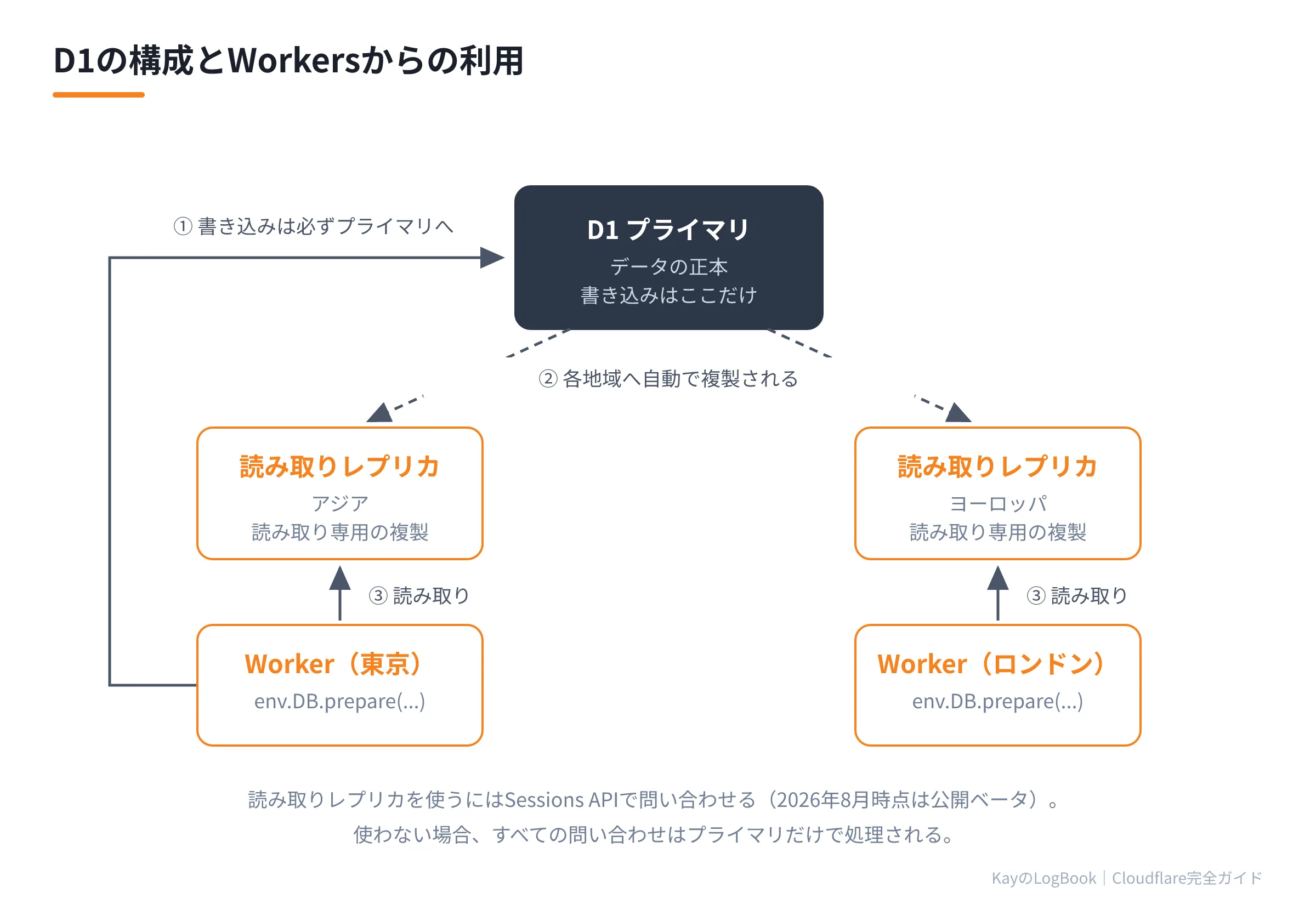
A D1 database has one primary (the source of truth), and all writes are processed there. If the primary is in Tokyo, every query from Europe makes a round trip to Tokyo.
Read replicas ease this. Cloudflare automatically provides read-only copies in regions around the world, and nearby replicas handle reads only. There are no additional storage or compute charges.
To use them, instead of writing plain SQL, you use the Sessions API. It attaches a condition saying “read this series of queries in a state that reflects at least the updates up to this point,” which guarantees that when you read what you yourself wrote, you always get the new value. As of August 2026, it’s offered as a public beta.
Without the Sessions API, all queries run on the primary only. In other words, if you do nothing, it behaves as it always has.
Pricing and “rows read”#
D1 pricing is based on storage plus the number of rows read and rows written.
| Free plan | Paid plan (Workers Paid) | |
|---|---|---|
| Rows read | 5 million per day | 25 billion per month included / $0.001 per million beyond that |
| Rows written | 100,000 per day | 50 million per month included / $1.00 per million beyond that |
| Storage | 5 GB | 5 GB included / $0.75 per GB per month beyond that |
There are no charges for data transfer or number of requests.
The important point here is that rows read are counted as “the rows the database examined,” not “the rows returned.”
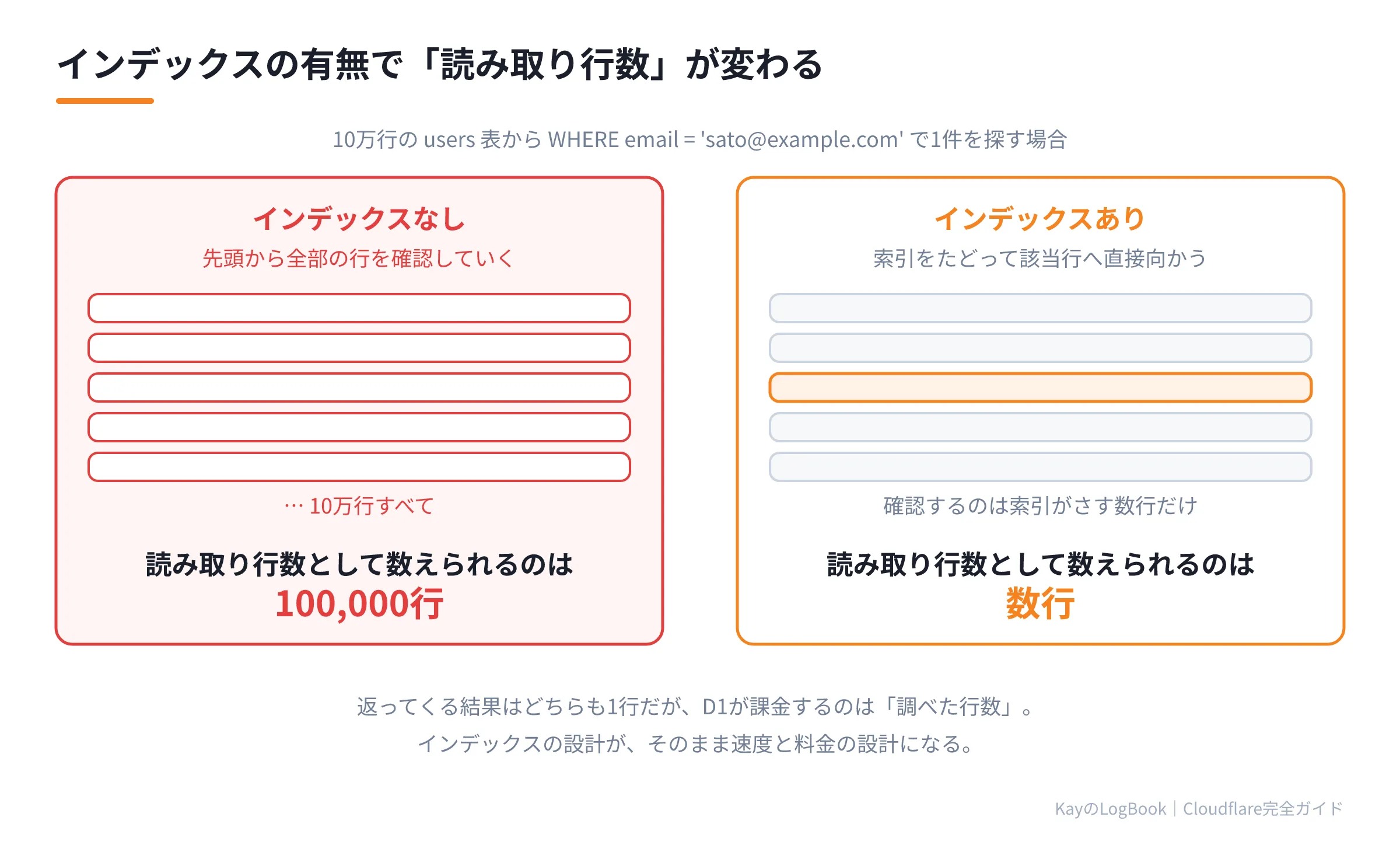
Consider finding one record in a 100,000-row table with WHERE email = '[email protected]'. If there’s no index on the email column, the database checks all 100,000 rows in order. Even though the result is one row, it counts as 100,000 rows read.
With an index on email, it only needs to follow the index and check a few rows. To get the same result, the cost and speed differ by orders of magnitude.
The free plan’s allowance of 5 million rows per day is plenty as long as your indexes are appropriate. On the other hand, repeated searches on tables without indexes will use it up in no time. In D1, index design is pricing design.
Limits#
| Item | Free plan | Paid plan |
|---|---|---|
| Number of databases | 10 | 50,000 |
| Size per database | 500 MB | 10 GB |
| Total storage per account | 5 GB | 1 TB |
| Queries per Worker invocation | 50 | 1,000 |
| Time Travel (point-in-time restore) retention | 7 days | 30 days |
Common limits: a single query can run for up to 30 seconds, a row or a single value can be up to 2 MB, an SQL statement can be up to 100,000 characters, and a table can have up to 100 columns.
Time Travel lets you restore a database to its state at any point in the past. Even without configuring backups, the paid plan lets you go back up to 30 days. Keep it in mind as a safety net for when you accidentally delete data.
Also note that a D1 database processes queries one at a time (single-threaded). The faster each query is, the more queries it can handle. Rather than concentrating everything in one huge database, a design that splits databases by purpose suits D1 better.
What it’s good for, and what it isn’t#
Good for
- Data management for personal sites and small to medium services (users, articles, products, orders and so on)
- Applications that are mostly reads, with relatively few writes
- Admin dashboards, internal tools, listings for reservations or inventory
- A data store for APIs built with Workers
- Aggregation, reports and other processing you want to express in SQL
Not good for
- Large data over 10 GB (the per-database limit on the paid plan)
- Workloads with large numbers of writes per second (since everything is processed at a single primary)
- The files themselves, such as images and videos (put them in R2 and record their location in D1)
- Uses dominated by simple reads that just fetch one key (KV is faster and cheaper)
- Using an existing PostgreSQL or MySQL database as is (that’s the job of Hyperdrive, on the next page)
Points for beginners to watch#
- Create indexes: They directly affect both cost and speed. Always consider them for columns used in
WHEREandJOIN - Avoid
SELECT *: Specifying only the columns you need reduces the amount of data handled - Always pass values with
bind(): Concatenating strings directly into SQL statements opens the door to SQL injection - DDL is billed too: Creating and altering tables (CREATE / ALTER / DROP) also counts toward rows read and written
- The free plan caps each database at 500 MB: If you expect serious use, design around the paid plan from an early stage
- Watch out for reads right after writes: If you enable read replicas, you may read stale values unless you use the Sessions API
- Time Travel isn’t unlimited: You can’t go back beyond the retention period (7 days free / 30 days paid)
Related services#
-
Workers: The runtime that queries D1. Connected via bindings
-
Workers KV: Faster if your workload is mostly simple reads (previous page)
-
R2: Where the files themselves are stored. Record their paths in D1
-
Durable Objects: Managing state that needs strong consistency in one place
-
Hyperdrive: A way to use existing PostgreSQL / MySQL databases quickly from Workers (next page)
-
Choosing a storage service: How to choose between R2 / KV / D1 / Durable Objects (the Chapter 6 wrap-up)
Summary#
- D1 is Cloudflare’s serverless SQL database, built on SQLite
- With tables, rows, columns and SQL, it can handle conditional searches and aggregation that KV can’t
- Writes go to a single primary; reads can be spread across replicas around the world (Sessions API, public beta)
- Pricing is based on “rows read, rows written and storage”; the free tier includes 5 million rows read per day
- Rows read are counted as the rows examined, so index design determines cost
- Up to 10 GB per database. Divide roles: files in R2, simple reads in KV
D1 was the option for “creating a new database inside Cloudflare.” In reality, though, there are many cases where you already have PostgreSQL or MySQL running and want to use it from Workers. The next page looks at the mechanism for that: Hyperdrive.