What Is AI Gateway? Managing and Monitoring AI APIs
On this page19 items
On the previous page, Workers AI, we saw that you can run AI models on Cloudflare. But real applications don’t necessarily use only Workers AI. You’ll call OpenAI’s API, Anthropic’s API and Google’s models as needed.
As AI calls multiply like this, you inevitably run into the same headaches.
- You have no idea how many calls you made this month, or how much they cost
- The same question keeps coming in, yet every time it’s sent to the model and billed
- You can’t tell when some user is hammering the API an abnormal number of times
- When a provider has an outage, your whole app goes down with it
- You can’t go back and check what was sent and what answer came back
AI Gateway is a service that solves these problems all at once.
What you’ll learn on this page#
- What AI Gateway does
- How to get started (just swap a URL)
- Key features such as caching, rate limiting and fallbacks
- Pricing, and how far the free tier goes
- What changed with the August 2026 integration with Workers AI
What is AI Gateway?#
AI Gateway is a relay point (proxy) placed between your application and AI models.
The idea is the same as the Cloudflare proxy you learned about in Part 1. By having the orange cloud receive website traffic first, caching, security and analytics could all be added afterward. AI Gateway does the same for calls to AI APIs.
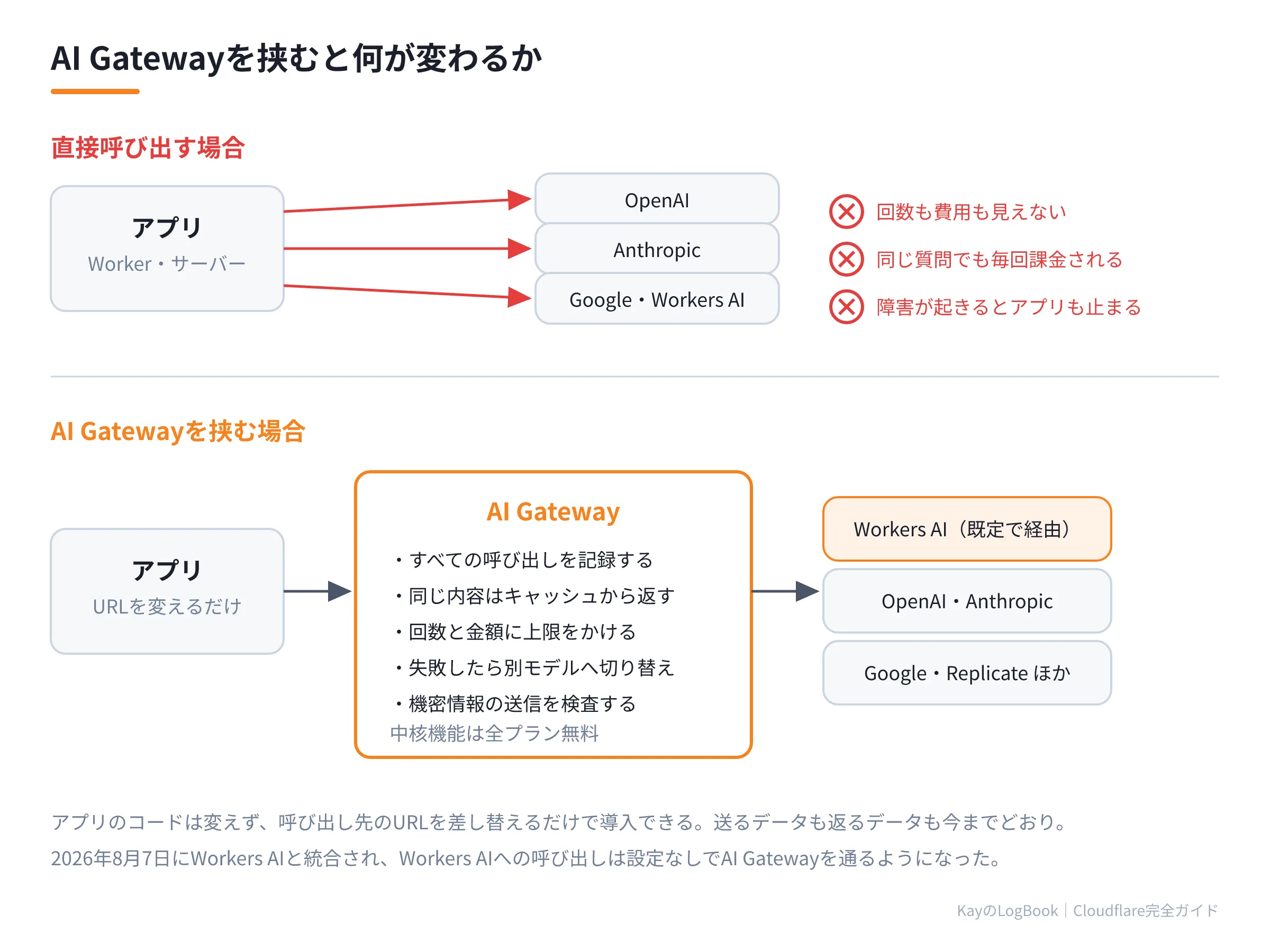
The important point is that you don’t have to change how your application is built. Just swap the destination URL for the AI Gateway one, and the rest of your existing code keeps working.
For example, if you were using OpenAI’s API, it looks like this.
Before: https://api.openai.com/v1/chat/completions
After:  https://gateway.ai.cloudflare.com/v1/{account ID}/{gateway name}/openai/v1/chat/completions
Neither the shape of the data you send nor the shape of the data you get back changes. The SDK you use stays the same too. This ease of “getting started with a one-line change” is AI Gateway’s biggest feature.
Supported providers include OpenAI, Anthropic, Google (Gemini), Workers AI, Replicate and many more, and the list keeps growing.
Key features#
Analytics and logs#
For every call, request counts, token counts, cost, error rate and response time are aggregated on the dashboard. You can also see breakdowns by provider and by model, so you can immediately tell “which model is to blame for costs being higher than last month.”
You can also save the request and response contents themselves as logs. When “a user says the answer was wrong,” being able to check what was actually sent and what came back is especially important in AI app development.
Caching#
When a request with the same content comes in, this returns a saved answer without calling the model.
AI APIs are expensive per call, and slow too. Simply caching processes that can return the same result every time, such as answers to frequently asked questions or summaries of the same text, greatly reduces both cost and wait time.
However, some uses suit caching and some don’t. Answers tailored to individual users, and requests that continue a conversation, must not be cached.
Rate limiting#
This sets a cap on the number of calls within a given time. It’s the same idea as Rate Limiting in Part 2, but this one works on calls to AI.
The reason AI apps need this isn’t limited to malicious users. A bug in your own code causes an infinite loop and runs up a huge bill overnight — that’s a common accident in AI development. If you set a cap, the damage stops there.
Spend Limits#
This sets a cap by amount of money rather than number of calls. You can set “up to this much this month” per model, per provider or per custom tag. It’s more intuitive than call counts, and especially useful when you’re worried about costs.
Retries and fallbacks#
When a provider returns an error, it can automatically retry or switch to a different model.
For example, if you configure “send to OpenAI first; if it fails due to an outage or overload, switch to a Workers AI model,” your app keeps running even if one side goes down. You can reduce the risk of depending on a single AI provider without writing any code.
Unified API#
This brings the endpoints and request formats that differ by provider together into a single entry point.
POST /ai/run: a common entry point for all models and all typesPOST /ai/v1/chat/completions: a format that works with OpenAI’s SDK as isPOST /ai/v1/responses: a format compatible with OpenAI’s Responses API
With this, you can switch models with almost no code changes. With AI models being replaced so quickly today, this ease of switching has enormous practical value.
Dynamic Routing#
This switches the destination model based on the content of the request. You build the conditions on the dashboard, so the app’s code doesn’t change.
- Short questions go to a cheap model, long questions to a high-performance model
- Send just 10% of users to a new model and compare the results (A/B testing)
- Change the destination by region
Guardrails and DLP#
Guardrails inspect the prompts you send and the answers that come back, detecting and blocking harmful content. The inspection itself is done by Workers AI models, so it’s billed according to token volume.
DLP (Data Loss Prevention) is the same mechanism covered in DLP and CASB in Part 3. It checks whether personal information, credit card numbers and the like are being sent to the AI. It’s a countermeasure against “employees pasting confidential information into external AI.”
Centralized key management (BYOK)#
You can store each provider’s API keys securely on the Cloudflare side and keep the keys out of your app’s code. It integrates with Cloudflare’s Secrets Store, so you don’t have to copy plaintext keys all over the place.
Pricing#
AI Gateway’s core features are free on all plans.
| Item | Details |
|---|---|
| Dashboard analytics, caching, rate limiting | Free on all plans |
| Stored logs | Workers Free plan: 100,000 total / Workers Paid plan: 10 million per gateway |
| DLP scanning | Free on all plans (free accounts get two default profiles; full with a Zero Trust subscription) |
| Guardrails | Workers AI token billing (based on the length of prompts and answers) |
| Logpush (exporting logs) | Workers Paid plan only. 10 million requests per month included, $0.05 per million beyond that |
| Unified Billing | 5% fee when purchasing credits. No markup on the inference unit price itself |
In other words, putting AI Gateway in between basically costs nothing in itself. Even free accounts can use analytics, caching and rate limiting as is. It’s positioned as a service with almost no reason not to use it.
Note that you still pay each provider separately when going through AI Gateway. AI Gateway isn’t a mechanism that takes over your bills; it’s a mechanism that makes them visible (except when using Unified Billing).
Integration with Workers AI (August 2026)#
On August 7, 2026, Cloudflare merged AI Gateway and Workers AI into a single control plane. This is an important change for reading Part 7.
Previously, Workers AI “ran the models” and AI Gateway “managed the calls” as separate products, and to use AI Gateway you had to configure it yourself and route through it.
After the integration, things work like this.
- Both can be used with the same AI binding and the same API endpoint
- Calls to Workers AI go through AI Gateway by default
- Without any configuration, every request is logged, and token counts and costs are aggregated per model
- Credits topped up in AI Gateway can pay for both Workers AI and external providers
- Using prepaid credits relaxes the rate limits on some Workers AI models
In other words, the moment you start using Workers AI, the observability features described on this page are already in effect. There’s no need to enable them separately.
Only when calling external providers do you still need to swap the URL (or configure BYOK) as before.
Deciding whether to adopt it#
You can decide whether to put AI Gateway in between with the following questions.
- Are AI calls part of a production application? → If so, you should use it. Visibility into costs and outages is too late once an accident has happened
- Do you use multiple providers, or might you in the future? → The unified API and fallbacks become much more valuable
- Are calls with the same content repeated? → Caching alone visibly reduces costs
- Is it a personal experimental script? → No need to force it, but just being able to see costs is reason enough for it to pay off
Things beginners should watch out for#
- Set the cache expiration to match the use case: too short and it has no effect; too long and stale answers keep coming back. Start on the short side and see how it goes
- Don’t cache per-user answers: caching conversation continuations or personalized content leads to accidents where someone else’s answer is returned. Choose what to cache carefully
- Logs keep what you send as is: for apps handling confidential information, consider log retention settings and using DLP alongside
- Always set a rate limit or a spend limit: huge bills from infinite loops are the most common accident in AI development
- The free plan keeps up to 100,000 logs: even in the prototype stage, you’ll hit this sooner than you think. If you need to manage volume, consider a paid plan
- The quality of the fallback differs: design on the assumption that answer quality changes with the model you switch to
Related services#
- Workers AI: run models on Cloudflare. Merged with AI Gateway in August 2026
- Workers: the runtime for applications that call AI Gateway
- Rate Limiting: access limits on the website side. The same idea
- DLP and CASB: data leak prevention. The same mechanism as AI Gateway’s scanning
- Workers KV: an option when you want to keep results on the app side, separate from AI Gateway’s cache
Summary#
- AI Gateway is a relay point between your app and AI models. You can adopt it just by swapping the destination URL
- It provides analytics, logs, caching, rate limiting, spend limits, retries, fallbacks, a unified API, dynamic routing, guardrails, DLP and centralized key management
- The core features are free on all plans. Putting it in between costs nothing in itself
- On August 7, 2026, it was merged with Workers AI, and Workers AI calls now go through AI Gateway by default
- If AI calls are part of production, it’s safest to put it in from the start
You now know how to run AI models and how to manage the calls to them. But when you try to make an AI answer questions about “your own site’s content” or “your company’s internal manuals,” the model can’t answer because it doesn’t know them. The next page covers RAG, an approach that solves this problem.