What Is Cloudflare? What the Service Can Do
On this page14 items
If you run a website, you’ve probably heard things like “Cloudflare makes your site faster” or “you can get security protection for free.” But explaining in a word what Cloudflare actually does is surprisingly hard. That’s because it has so many features: CDN, DNS, security, serverless development, AI.
As the first page of The Complete Cloudflare Guide, this page lays out the big picture of Cloudflare. Detailed mechanisms are covered carefully one by one in the pages that follow, so for now, aim to get a map in your head of “what Cloudflare is and what it can do.”
What you’ll learn on this page#
- What kind of company and service Cloudflare is
- Cloudflare’s basic mechanism (the idea of standing between users and servers)
- The big picture of what Cloudflare can do (four pillars)
- Where it’s useful for individuals and for companies
- The rough structure of the pricing plans, and what you can use for free
What is Cloudflare?#
Cloudflare as a company#
Cloudflare is an internet infrastructure company founded in the United States in 2009, which launched its service in 2010. With the mission to “help build a better Internet,” it started out offering services to speed up and protect websites.
Today it has data centers in more than 330 cities across more than 125 countries and regions, and it states that roughly 20% of the world’s websites are delivered through Cloudflare. 95% of the world’s internet users are within about 50 milliseconds of a Cloudflare data center. This “network spread across the globe” is Cloudflare’s greatest asset, and all the services described below run on top of it.
Cloudflare calls itself a Connectivity Cloud. It sounds complicated, but it’s enough to understand it as “a cloud for securely connecting people, apps, and networks, wherever they are.”
The basic mechanism: standing between users and servers#
The basic structure shared by many of Cloudflare’s services is very simple. Cloudflare sits between your website (the server) and its visitors (users), and takes on all traffic first.
Visitor requests first arrive at Cloudflare’s locations distributed around the world (called the edge). The edge is close to the visitor, so cached content can be returned quickly without fetching it from a faraway server. At the same time, attacks and unauthorized access are blocked at the edge, so only legitimate requests reach your server.
Just by “standing in between,” it achieves both speed and protection. This is Cloudflare’s origin and its most important idea. The details of this mechanism (a reverse proxy, commonly known as the orange cloud) are explained step by step in later pages.
What can Cloudflare do? Four pillars#
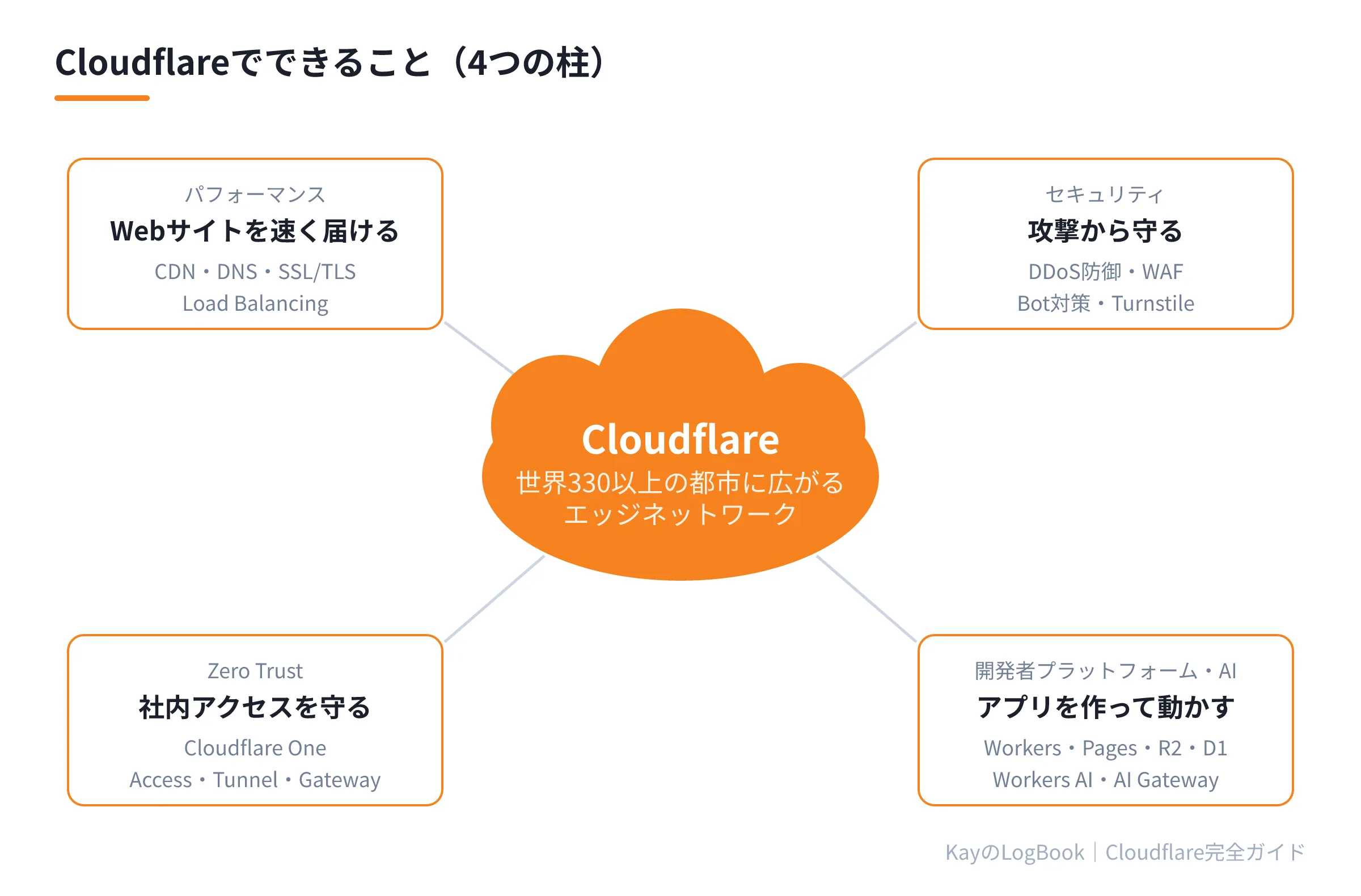
Cloudflare has a huge number of services; the official documentation lists more than 100 products. Broadly, though, they can be organized into the following four pillars.
1. Delivering websites fast (performance)#
The flagship is the CDN (Content Delivery Network), which caches content at edges around the world and delivers it from the location closest to the visitor. Alongside it are DNS, which translates domain names into IP addresses, automatic issuance of SSL/TLS certificates that encrypt traffic, load balancing, and more.
- Main services: CDN, DNS, SSL/TLS, Load Balancing
2. Protecting against attacks (security)#
Protection against DDoS attacks, which try to take a site down with massive traffic, is provided with unlimited capacity even on the free plan. There’s also a full set of features for protecting websites, including the WAF (Web Application Firewall), which inspects malicious requests, bot countermeasures, and Turnstile, a CAPTCHA alternative for verification.
- Main services: DDoS Protection, WAF, bot management, Rate Limiting, Turnstile
3. Securing internal access (Zero Trust)#
While the first two pillars target “public-facing websites,” the third protects “access to internal systems and business apps.” It’s a family of products based on the Zero Trust idea of verifying identity on every access instead of using a VPN, unified under the name Cloudflare One.
Cloudflare Tunnel, which lets you safely expose a home NAS or internal server to the outside without opening ports, is also part of this pillar. It’s a very popular feature for personal home servers too.
- Main services: Cloudflare One (Access, Tunnel, Gateway, WARP, etc.)
4. Building and running applications (developer platform, AI)#
Cloudflare isn’t just a service that “protects and speeds things up.” Centered on Cloudflare Workers, a serverless runtime that executes programs at edges around the world, there’s a developer platform for building entire applications on Cloudflare, including static site hosting (Pages), object storage (R2), and a database (D1).
AI offerings have expanded remarkably in recent years, including Workers AI, which runs AI models at the edge; AI Gateway, which manages AI API usage; and AI Search (formerly AutoRAG), which lets you build an AI that answers from your own documents.
- Main services: Workers, Pages, R2, D1, Workers AI, AI Gateway, AI Search
Personal use and business use#
Cloudflare may look like a service for huge corporations, but in practice individuals use it widely too. Let’s sort out where it’s useful from each perspective.
For individuals and small sites: Put a blog or portfolio site on a custom domain behind Cloudflare, and you get CDN acceleration, an SSL certificate, and DDoS protection while staying on the free plan. It’s also great for hobby development: safely exposing a home NAS or Raspberry Pi with Cloudflare Tunnel, or running small apps on the Workers free tier.
For companies: In addition to protecting and accelerating corporate and e-commerce sites, it broadly covers the territory handled by IT departments, such as access control for internal systems through Zero Trust, unifying networks across multiple sites, and API protection. It’s valued for consolidating functions that used to require combining equipment and services from multiple vendors into just Cloudflare.
Overview of pricing plans#
Cloudflare’s base plans come in four tiers, chosen per website (domain).
| Plan | Monthly (billed annually) | Intended users |
|---|---|---|
| Free | Free | Personal sites, blogs, testing |
| Pro | $20 | Small business sites |
| Business | $200 | Production corporate sites, e-commerce sites |
| Enterprise | Custom quote | Large-scale, mission-critical use |
What stands out is how much the free plan includes. Core features such as CDN, DNS, SSL certificates, and unlimited DDoS protection are free permanently, not for a limited time. The basic approach is “start for free, then add a higher plan or individual services when you need them.”
Note that developer services like Workers and R2 are billed separately from the per-site plans above, on a pay-as-you-go basis (with free tiers). The details of each plan and how to choose are explained on their own dedicated pages.
Points for beginners to watch out for#
- With so many features, it’s easy to get lost: You don’t need to understand everything from the start. The standard approach is to begin with the basic combination of “DNS + CDN + SSL.” This guide proceeds in that order too.
- You don’t move your site; you put Cloudflare in front of it: Even with Cloudflare, your website itself (the server) stays where it is. You don’t need to give up your hosting or WordPress; Cloudflare simply sits in front of it (putting the site itself on Cloudflare with Workers or Pages is a separate story).
- Setup requires basic DNS knowledge: Setting up Cloudflare is essentially DNS configuration. Getting a solid grasp of DNS on the next page before moving on will help you avoid stumbling.
- Watch out for pay-as-you-go billing in US dollars: Paid features are billed in US dollars. For business use, keep in mind when seeking budget approval that the amount varies with exchange rates and usage.
Summary#
- Cloudflare provides web acceleration, security, Zero Trust, and an app development platform on its own network spanning more than 330 cities worldwide
- Its basic mechanism is “standing between users and servers.” That alone achieves speed and protection at the same time
- What it can do falls into four pillars: deliver fast / protect against attacks / secure internal access / build and run apps
- From free personal use to infrastructure consolidation at large enterprises, it covers everything on the same foundation
- The free plan is very generous, and a personal site can be practical while staying free