What Is Zero Trust? How It Differs from Perimeter Security
On this page13 items
The theme of Chapter 3 is Zero Trust. Chapter 2 covered how to protect websites and APIs published on the internet from outside attacks. This chapter flips the perspective. What we protect here are things “meant to be used only by a limited group of people,” such as internal systems, business apps and NAS admin screens, as well as the “devices of employees and family members” that use them.
Zero Trust isn’t the name of a specific product; it’s a security design philosophy. This page first explains the traditional approach, perimeter security, then looks at why it reached its limits and what Zero Trust changes and how. Once this way of thinking clicks, the roles of the individual Cloudflare products covered on the following pages (Access, Tunnel, Gateway, WARP) become much easier to understand.
What you’ll learn on this page#
- What perimeter security is
- Three reasons perimeter security reached its limits
- The basic principle of Zero Trust: “never trust, always verify”
- The three things used for verification (identity, device, context)
- An entry point to the Cloudflare products that implement Zero Trust
What is perimeter security: “castle and moat” security#
Separate inside from outside, and fortify only the boundary#
Traditional corporate network security has been built on a concept called perimeter security. It’s often compared to a “castle and moat.”
- The internal network is “inside the castle”; the internet is “outside the castle”
- A firewall serves as the “moat and gate” at the boundary, keeping intruders out
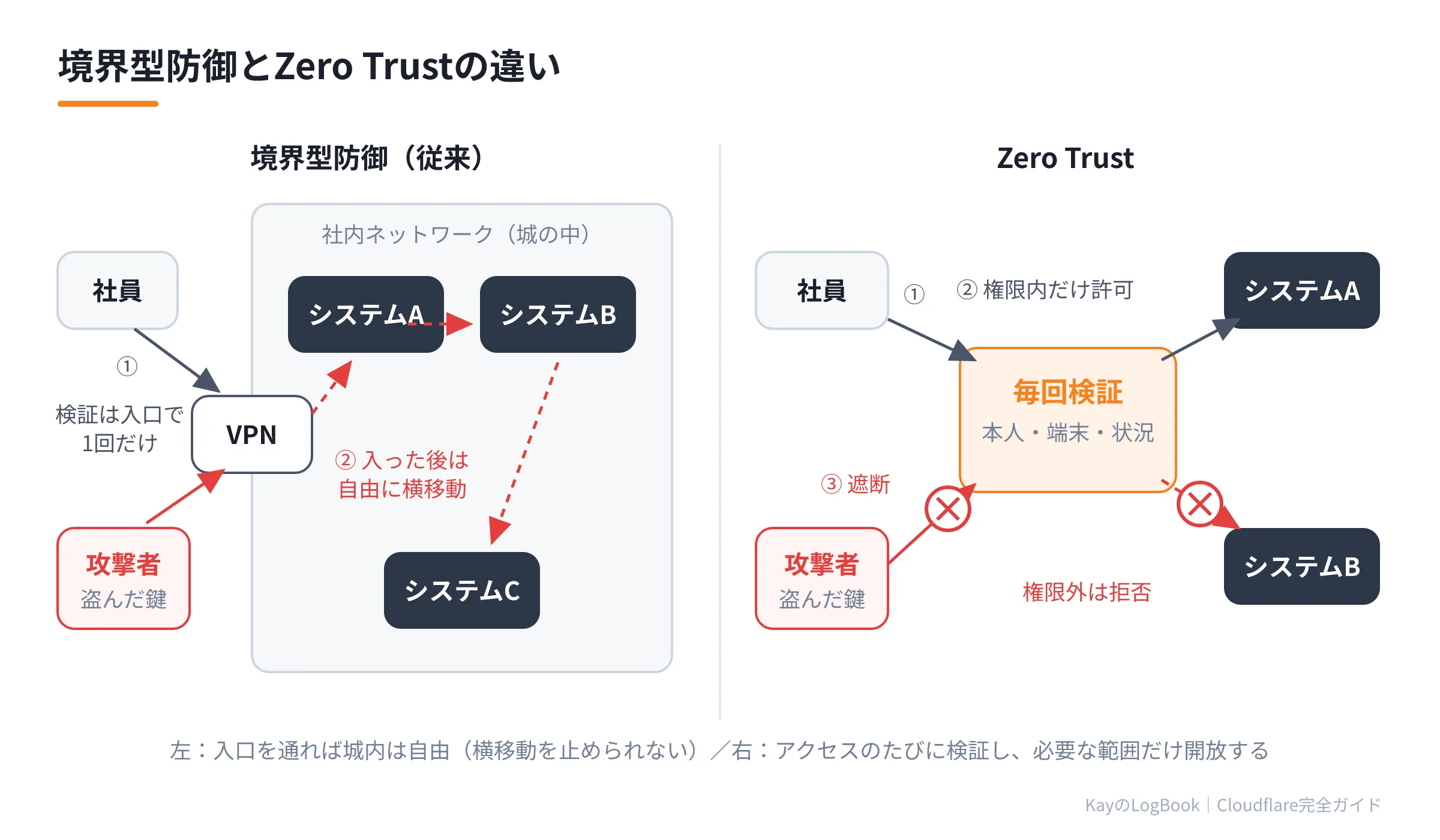
- Employees who want to use internal systems from outside cross the “drawbridge” of a VPN (Virtual Private Network, a technology that creates an encrypted private channel) to get inside the castle
The premise of this approach is simple: “Those inside the castle are allies, so trust them. The outside is dangerous, so be suspicious.” Location (which network you’re on) was itself the basis for trust. Even today, it’s not uncommon for companies to let anyone connected to the office LAN access many systems without any checks.
Three reasons perimeter security reached its limits#
The castle-wall model stopped fitting modern ways of working because of three changes.
- What needs protecting moved outside the castle: Business data now lives not only on internal servers but also on SaaS (services used over the internet) such as Microsoft 365 and Google Workspace. No matter how much you fortify the inside of the castle walls, much of the treasure is already in the cloud outside
- The people working moved outside the castle too: With the spread of remote work, employees work from home or cafés. A setup where everyone enters the castle through a VPN and then heads back out to the cloud concentrates load on the VPN appliance and slows things down, and the vulnerabilities of VPN appliances themselves have become targets for attackers as the “keyhole of the castle gate”
- It’s weak once breached: This is the biggest weakness of perimeter security. If a single VPN password is stolen through phishing or similar means, the attacker gets into the castle as an “ally.” Since trust is assumed inside the castle, there’s nothing to stop lateral movement, hopping from one server to the next. Many of the large data breaches in recent years have happened through this route
What is Zero Trust: “never trust, always verify”#
Verify each access, not the location#
Zero Trust turns this premise on its head. Its motto is “Never trust, always verify.” It doesn’t treat “location,” whether you’re on the internal network, as grounds for trust; inside and outside alike start from zero trust.
Then, every time a request to access a system comes in, it’s verified. Rather than “once you’re inside the castle, you’re free to roam,” picture a guard stationed in front of every room checking your ID each time you enter. Mainly three things are checked.
- Identity: Is the user authenticated as the correct person? Have they passed multi-factor authentication (authentication that combines a password with something else, such as confirmation on a phone)?
- Device: Is it a company-managed device? Is the OS up to date, and is the disk encrypted? (The health of a device like this is called device posture)
- Context: Are the country and time of the access natural? Is the user behaving differently from usual?
Least privilege: open only the rooms someone may enter#
The other pillar is least privilege. Even people who pass verification get access only to the systems their work requires. Only the accounting system for the accounting staff, only the development servers for developers, and so on. That way, even if one person’s credentials are compromised, what the attacker can do is limited to that person’s permissions, sealing off the lateral movement that was perimeter security’s weakness.
What’s important is that Zero Trust isn’t “a product you buy and you’re done,” but a design philosophy. Implementing it requires combining multiple components, such as authentication, device management and traffic inspection.
How Cloudflare implements Zero Trust#
Cloudflare provides the full set of components for implementing Zero Trust as a product family called Cloudflare One. As covered in Chapter 1, Cloudflare is a huge network with data centers around the world. It uses all of those locations as “checkpoints that are everywhere,” verifying every access between users and systems.
- Cloudflare Access: A guard standing in front of your apps. It verifies identity and device on every access
- Cloudflare Tunnel: A side entrance that securely connects servers and NAS devices to Cloudflare without opening ports
- Cloudflare Gateway: A filter that inspects traffic going out from employees’ devices to the internet
- WARP (Cloudflare One Client): An app for connecting devices to Cloudflare
Each is covered one at a time on the following pages of this chapter. The pricing is worth noting: these Zero Trust features are free for up to 50 users (as of August 2026). Company-wide rollouts require a paid plan (from $7 per user per month), but individuals, households and small teams can build serious Zero Trust setups on the free tier.
Example: Zero Trust matters to individuals too#
Zero Trust isn’t just for large companies. For example, suppose you want to use the admin screen of your NAS (network-attached storage) at home while you’re out.
- The perimeter mindset: Open a port on your router and publish the admin screen on the internet. The login screen is exposed to the whole world and faces nonstop password brute-force attacks
- The Zero Trust mindset: Keep the admin screen private and connect it to Cloudflare with Tunnel, then put Access in front of it. Only people who authenticate with your email address can even reach the login screen
The attack surface visible to attackers is completely different between the two. You’ll actually build this setup hands-on in a Chapter 8 page.
Points for beginners to watch#
- Zero Trust isn’t a product name: You can’t “buy Zero Trust.” Vendor products are just means of implementing it; deciding which access to allow to whom is up to you
- It’s not about throwing away your VPN today: Many organizations migrate gradually, using VPN and Zero Trust side by side. You can start with a small step, such as putting one app behind Access
- The authentication foundation is everything: Zero Trust relies heavily on “verifying who you are.” Stopping password reuse and enabling multi-factor authentication is the first step, ahead of deploying any product
- You’re verified even inside the office: After rollout, accesses from the office LAN also require authentication. If you understand that this is exactly the point, rather than “it got less convenient even inside the office,” there’s less confusion during rollout
Related services#
- Cloudflare One: The umbrella name for Cloudflare’s Zero Trust products (next page)
- Cloudflare Access / Tunnel / Gateway / WARP: The main components explained in turn in this chapter
- WAF and DDoS Protection: The Chapter 2 features that protect public-facing sites. Combined with Zero Trust, they complete your overall defense
Summary#
- Perimeter security is location-based security that “trusts the inside and suspects the outside,” often compared to a castle and moat
- It reached its limits because of the spread of cloud services and remote work, and its structural weakness against lateral movement after a breach
- The principle of Zero Trust is “never trust, always verify.” It verifies identity, device and context on every access, and grants least privilege
- Zero Trust is a design philosophy; buying a product doesn’t finish the job
- Cloudflare provides the components as Cloudflare One, free for up to 50 users