What Is SSL/TLS? How HTTPS and Certificates Work
On this page16 items
On the previous page, “What is the Cloudflare proxy? How the orange cloud works,” you learned about the structure in which Cloudflare stands between visitors and the origin server. This raises a new question: encryption of the connection. How is HTTPS, the thing that shows a padlock in the browser’s address bar, achieved in a setup where Cloudflare sits in the middle?
In fact, “adding Cloudflare gave me HTTPS for free” is one of the big reasons people choose Cloudflare. But if you use it without understanding how it works, there’s a pitfall: “the padlock was showing, but behind the scenes nothing was encrypted.” This page covers everything from the basics of SSL/TLS to choosing Cloudflare’s own encryption modes.
What you’ll learn on this page#
- What SSL/TLS is, and how it differs from HTTPS
- The three things encryption protects against (eavesdropping, tampering and impersonation)
- The roles of server certificates and certificate authorities (CAs)
- How Cloudflare enables HTTPS for free (Universal SSL)
- The differences between the encryption modes (Flexible / Full / Full (Strict)) and how to choose correctly
What is SSL/TLS?#
Turning HTTP “postcards” into HTTPS “sealed letters”#
Web communication follows a set of rules called HTTP (HyperText Transfer Protocol), but plain HTTP isn’t encrypted. Traffic passes through many network devices along the way, so unencrypted traffic can be read or altered en route. It’s like a mail carrier being able to read what you wrote on a postcard.
The technology that encrypts this traffic and turns it into a sealed letter is SSL/TLS. It was originally born under the name SSL (Secure Sockets Layer), and its successor standard was renamed TLS (Transport Layer Security). What’s actually used today is TLS, but because terms like “SSL certificate” and “enabling SSL” have stuck, it’s still customary to refer to both together as SSL/TLS. This guide follows that convention.
HTTP wrapped in SSL/TLS to make it secure is HTTPS (HTTP Secure). The URL starts with “https://” and the browser shows a padlock.
Three things encryption protects#
SSL/TLS isn’t just a technology for making content unreadable. It comes with three protections as a set.
- Preventing eavesdropping (encryption): third parties can’t read the content of the traffic. This is the most obvious role, protecting passwords and credit card numbers
- Detecting tampering: it verifies that the traffic wasn’t altered along the way. This prevents viruses being slipped into downloaded files or false information being injected into pages
- Preventing impersonation (authentication): it confirms that you’re connected to the genuine “kaylog.io” server. What supports this is the certificate, explained next
Server certificates and certificate authorities#
Cryptography alone can’t tell whether the server you’re connecting to is genuine. That’s where server certificates come in. A certificate is an electronic proof that says “this server belongs to the legitimate administrator of this domain,” issued by a trusted third party called a certificate authority (CA) after verifying control over the domain.
Browsers come with a built-in list of trusted certificate authorities, and on connection they verify the certificate the server presents. If it’s signed by a trusted CA, the domain name matches and it’s within its validity period, the padlock is shown. Conversely, if verification fails, you get a warning screen like “Your connection is not private.” You’ve probably seen one at least once.
Certificates used to be something you bought for thousands to tens of thousands of yen a year, but free certificate authorities (such as Let’s Encrypt) are now widespread, and as described below, with Cloudflare you don’t even need to obtain one manually.
HTTPS is now “required on every page”#
HTTPS isn’t just for login pages. Major browsers warn “Not secure” on unencrypted HTTP pages, and search engines use HTTPS as a ranking factor. For every website, including personal blogs, HTTPS on every page is today’s standard.
How SSL/TLS is used on Cloudflare#
Universal SSL: automatic certificate issuance and renewal#
When you add a domain to Cloudflare and enable the proxy (orange cloud), a feature called Universal SSL automatically issues a server certificate for that domain for free. It covers the apex domain (kaylog.io) and first-level subdomains (such as www.kaylog.io). Issuance goes through certificate authorities Cloudflare partners with (such as Let’s Encrypt and Google Trust Services), and renewal before expiry is fully automatic.
The tasks of obtaining, installing and renewing certificates, which used to plague site administrators, disappear entirely. That’s what “adding Cloudflare gave me HTTPS for free” really means.
The connection has two legs: this is the most important point#
However, if you’ve read the previous page, you’ll notice something. In a proxy setup, the connection is split into two legs.
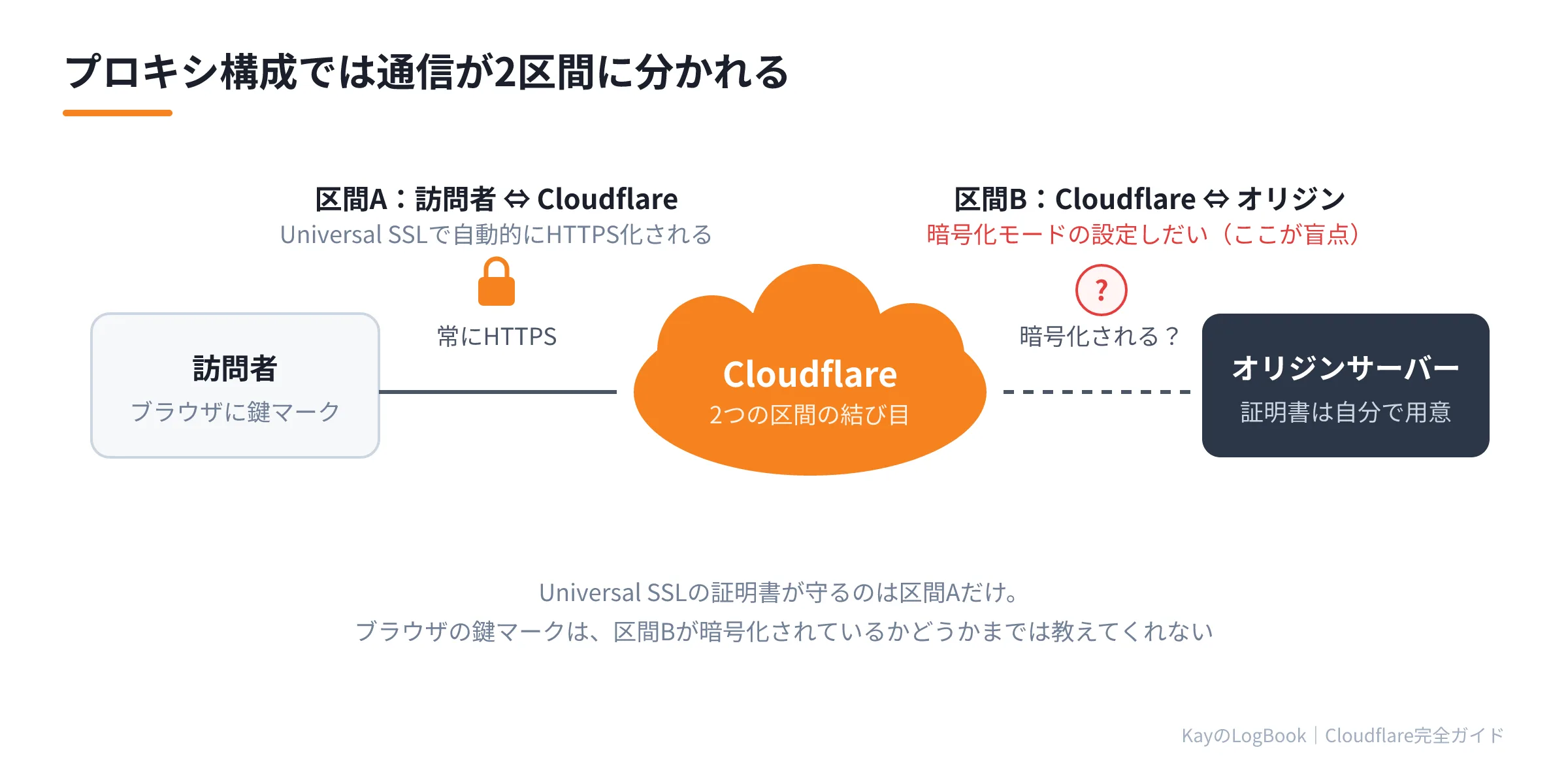
- Leg A: the visitor’s browser ⇔ Cloudflare
- Leg B: Cloudflare ⇔ the origin server
The Universal SSL certificate only encrypts leg A. How leg B is handled is a separate setting, and that’s decided by the encryption mode. The browser’s padlock only reflects the state of leg A, so “padlock showing = secure all the way to the end” isn’t necessarily true.
Encryption modes: deciding how leg B is handled#
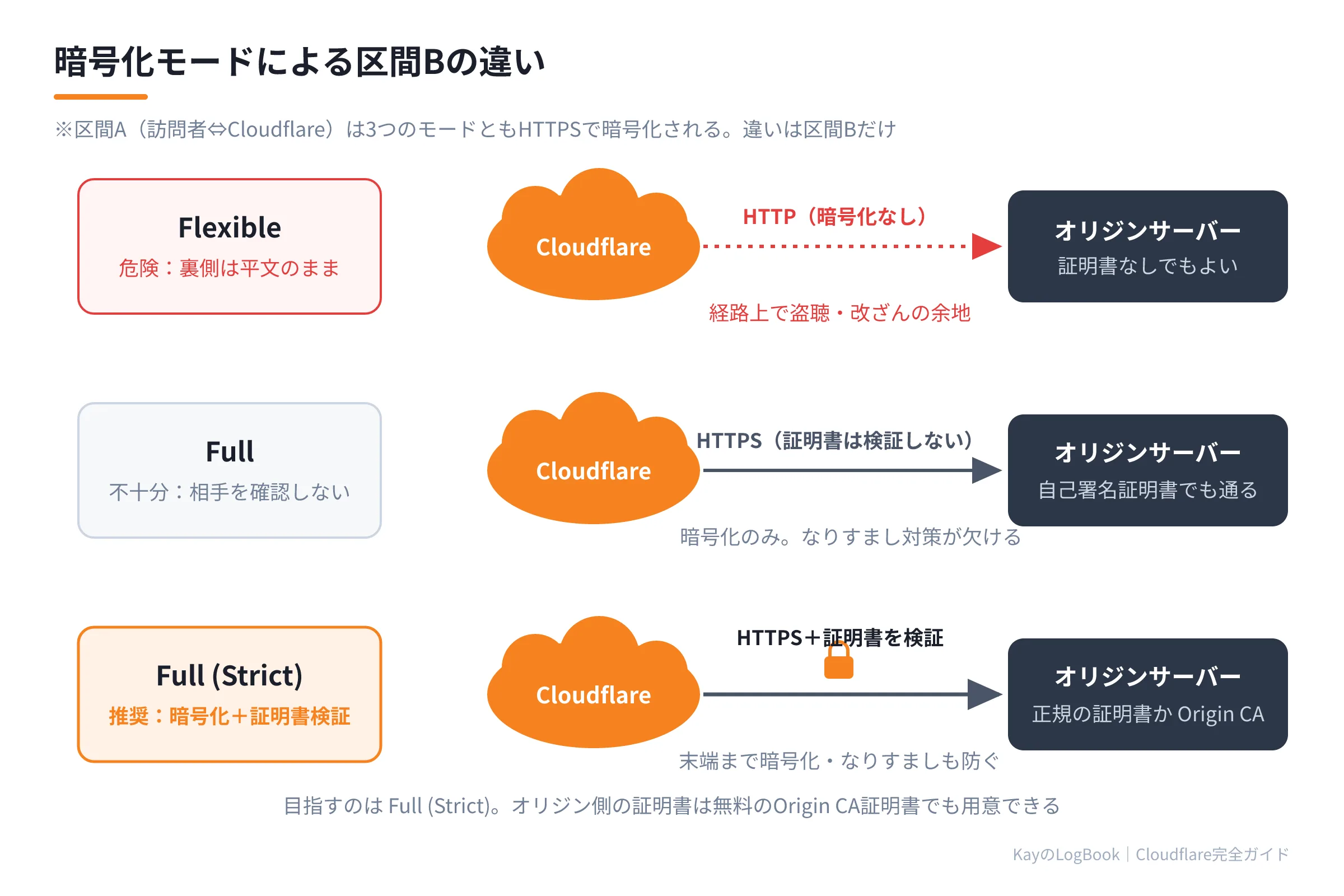
Cloudflare’s encryption modes mainly come in the following types (listed from most dangerous).
- Off: neither leg A nor B is encrypted. Out of the question
- Flexible: leg A is encrypted, but leg B connects over unencrypted HTTP. Visitors see a padlock, yet plaintext flows from Cloudflare to the origin server — this is the most misunderstood mode. Think of it as a stopgap for when you can’t set up a certificate on the origin server
- Full: leg B is encrypted too, but the origin server’s certificate isn’t verified. It connects even with a self-signed certificate (one you made yourself). It’s encrypted, but protection against impersonation is missing
- Full (Strict): leg B is encrypted and the certificate is verified. This is the recommended setting. The origin server needs a certificate from a trusted CA, or the Origin CA certificate described below
There’s also a top-tier mode called Strict (SSL-Only Origin Pull), which always uses HTTPS for leg B regardless of how leg A was received, and Automatic SSL/TLS (the current default), which diagnoses your site and automatically picks the best mode that can be applied safely. Even if you leave it to automatic selection, the state to aim for is still Full (Strict).
Origin CA certificates: free certificates just for leg B#
Hearing “origin server certificate,” you might think you’re back to obtaining certificates again. Here Cloudflare offers a clever mechanism: the Origin CA certificate, a free certificate issued by Cloudflare itself.
It’s a certificate that only Cloudflare trusts, dedicated to leg B (Cloudflare ⇔ origin server). Ordinary browsers don’t trust it, so it can’t be used on its own, but in a proxied setup it’s only used for leg B, so that’s no problem. Its validity can be as long as 15 years, so renewal work all but disappears. Issue it from the dashboard in a few clicks, install it on the origin server, and you meet the requirements of Full (Strict).
Example: setting a rental-server blog to Full (Strict)#
Here’s an example setup for publishing a WordPress blog through Cloudflare.
- Leg A: when you enable the orange cloud, a Universal SSL certificate is issued automatically and HTTPS with visitors begins
- Leg B: enable the free SSL (such as Let’s Encrypt) on the rental server side. Most rental servers let you set it up with one click. If that’s difficult in your environment, install an Origin CA certificate
- Set the encryption mode to Full (Strict)
- Also enable “Always Use HTTPS” so that access via http:// is automatically redirected to https://, completing HTTPS on every page
Things beginners should watch out for#
- Don’t leave it on Flexible: the padlock shows, so it looks finished at first glance, but leg B behind the scenes is plaintext. Especially for sites handling personal information or passwords, go all the way to Full (Strict)
- Suspect the mode setting for redirect loops: in Flexible mode, Cloudflare connects to the origin server over HTTP. If the origin server has a “redirect HTTP to HTTPS” setting, the redirects repeat forever and the page can’t be displayed (a redirect loop). If you get this error after adding Cloudflare, check the encryption mode first
- Watch out for mixed content: if an HTTPS page still loads images or scripts starting with “http://”, browsers show warnings or block the loading. In WordPress, change the site URL setting and URLs in past posts to https
- Certificate coverage: Universal SSL covers only up to first-level subdomains. To use deeper levels such as “blog.app.kaylog.io,” you need the paid Advanced Certificate Manager ($10 per month)
Related services#
- Universal SSL: the free automatic certificate described on this page. It works together with the orange cloud
- Origin CA certificate: a free certificate just for leg B. Valid for up to 15 years
- Advanced Certificate Manager: a paid option ($10 per month) that supports deeper subdomain levels and lets you customize the CA and encryption settings
- HSTS and minimum TLS version settings: a set of settings that further strengthen always-on HTTPS. It’s enough to consider them once you’re used to running things
Summary#
- SSL/TLS is a technology that provides encryption, tamper detection and impersonation prevention all together, and applied to HTTP it becomes HTTPS
- The legitimacy of the server you connect to is verified with a server certificate issued by a certificate authority
- On Cloudflare, enabling the orange cloud makes Universal SSL issue and renew certificates automatically
- A proxied connection has two legs, and the browser’s padlock only guarantees leg A (visitor ⇔ Cloudflare)
- How leg B is handled depends on the encryption mode. Aim for Full (Strict). Flexible is a stopgap
- The origin server’s certificate can come from the rental server’s free SSL or a free Origin CA certificate