What Are Queues and Workflows? Asynchronous Processing on Cloudflare
On this page10 items
Durable Objects, on the previous page, were a mechanism for “handling simultaneous requests correctly, one at a time.” Queues and Workflows, covered on this page, take a different angle: they’re mechanisms for “reliably finishing, later, work that doesn’t need to return right now.”
When you build web applications, you always run into “heavy processing.” Image conversion, sending email, calling external APIs, generating text with AI. If you run these while the user waits, the screen freezes, and if an error happens midway, everything has to start over. The standard answer to this problem is asynchronous processing, and on Cloudflare, Queues and Workflows fill that role.
What you’ll learn on this page#
- What asynchronous processing is and why it’s needed
- How Cloudflare Queues works (producers, consumers, retries, dead letter queues)
- How Cloudflare Workflows works (durable execution split into steps)
- The differences between Queues and Workflows and when to use each
- Pricing and the main limits
What is asynchronous processing?#
Finishing all processing between the moment the user presses a button and the moment the result comes back is called synchronous processing. It’s easy to understand, but the heavier the processing, the longer the wait.
With asynchronous processing, you reply only “Got it” when the request arrives and carry out the actual work in the background. The user isn’t kept waiting, and if something fails partway through, you can redo just that part.
Take user sign-up as an example. With synchronous processing, it goes in a straight line — “register → send welcome email → create initial data → show completion screen” — and if the external email service stalls for a few seconds, the user waits that much longer. With asynchronous processing, you just complete the registration and return the completion screen immediately, while sending the email and creating the initial data proceed in the background.
The place where you leave this “background work” is a queue, and when that work spans multiple steps, managing its progress is the job of a workflow.
Cloudflare Queues: leave work and process it in order#
Queues takes messages (work orders) sent from Workers, holds them, and hands them in order to another Worker. There are only two players.
- Producer (sender): a Worker that sends what needs processing to the queue
- Consumer (receiver): a Worker that receives messages from the queue and actually processes them
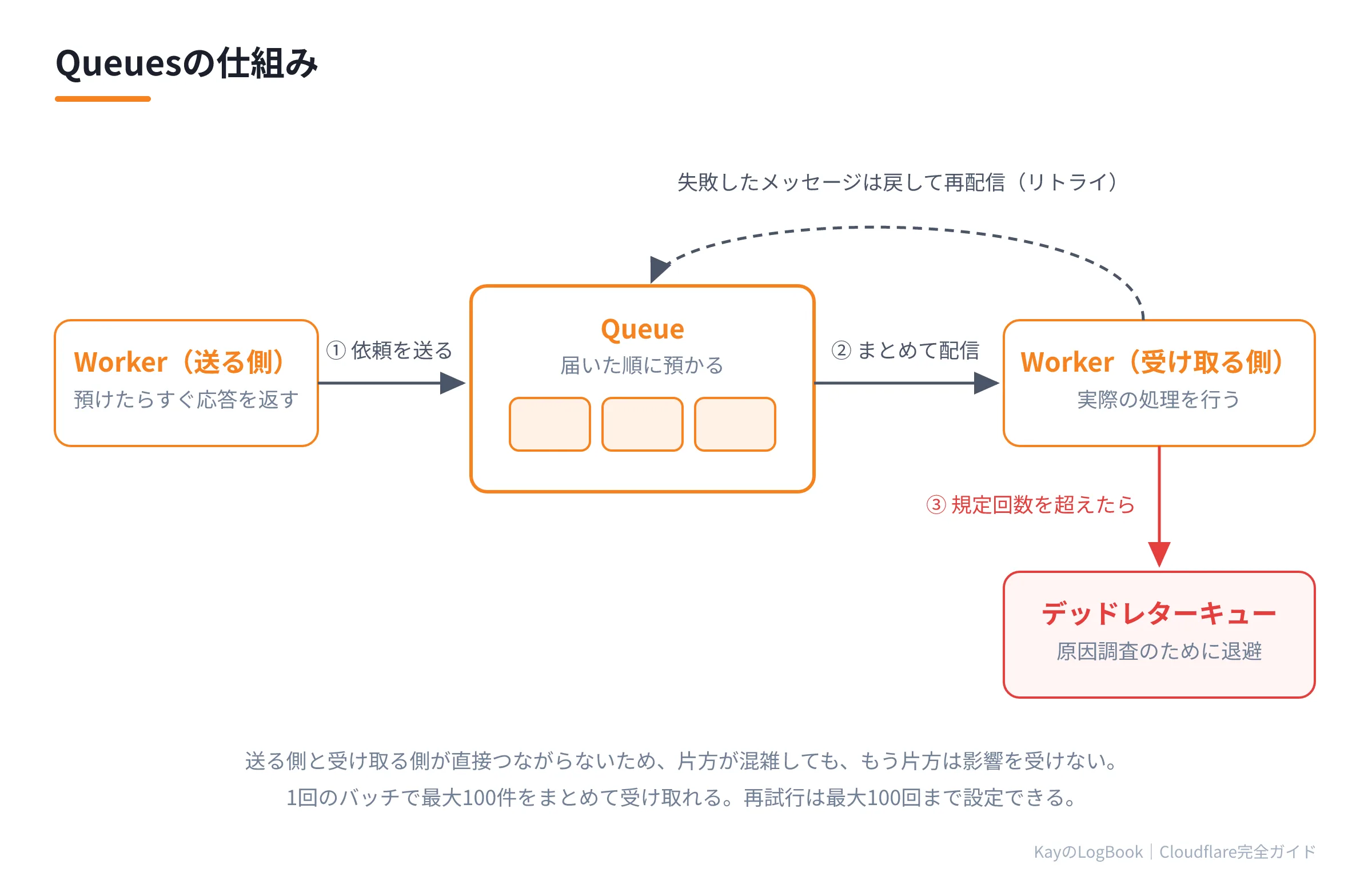
The sender is done with its job the moment it hands off to the queue. The receiver works through things at its own pace. Because the two aren’t directly connected, if one gets congested, the other isn’t affected.
The three practical points of Queues are these.
Batching: messages can be received not one at a time but up to 100 at once. This is more efficient than processing one by one and keeps the number of invocations down.
Automatic retries: a message that hits an error during processing is returned to the queue and delivered again. It’s built to withstand failures that fix themselves with time, like a temporary glitch in an external API. You can configure up to 100 retries.
Dead letter queues: a message that fails no matter how many times you try will retry forever if left alone. To avoid this, messages that exceed the set number of attempts can be moved aside to a separate queue (a dead letter queue). Later you can inspect the contents, investigate the cause and deal with it.
You can also use delayed delivery, which holds back delivery for a specified time. Things like “send a confirmation email 30 minutes later” can be written without building your own timer.
Cloudflare Workflows: pick up where it left off, even after a crash#
Where Queues is a mechanism for “reliably handing off a single piece of work,” Workflows is a mechanism for “reliably running a series of multiple steps all the way to the end.”
In Workflows, you write processing split into steps. Each step’s result is saved automatically, and if a step fails midway, execution resumes from that step. Steps that already finished are never redone. This property is called durable execution.
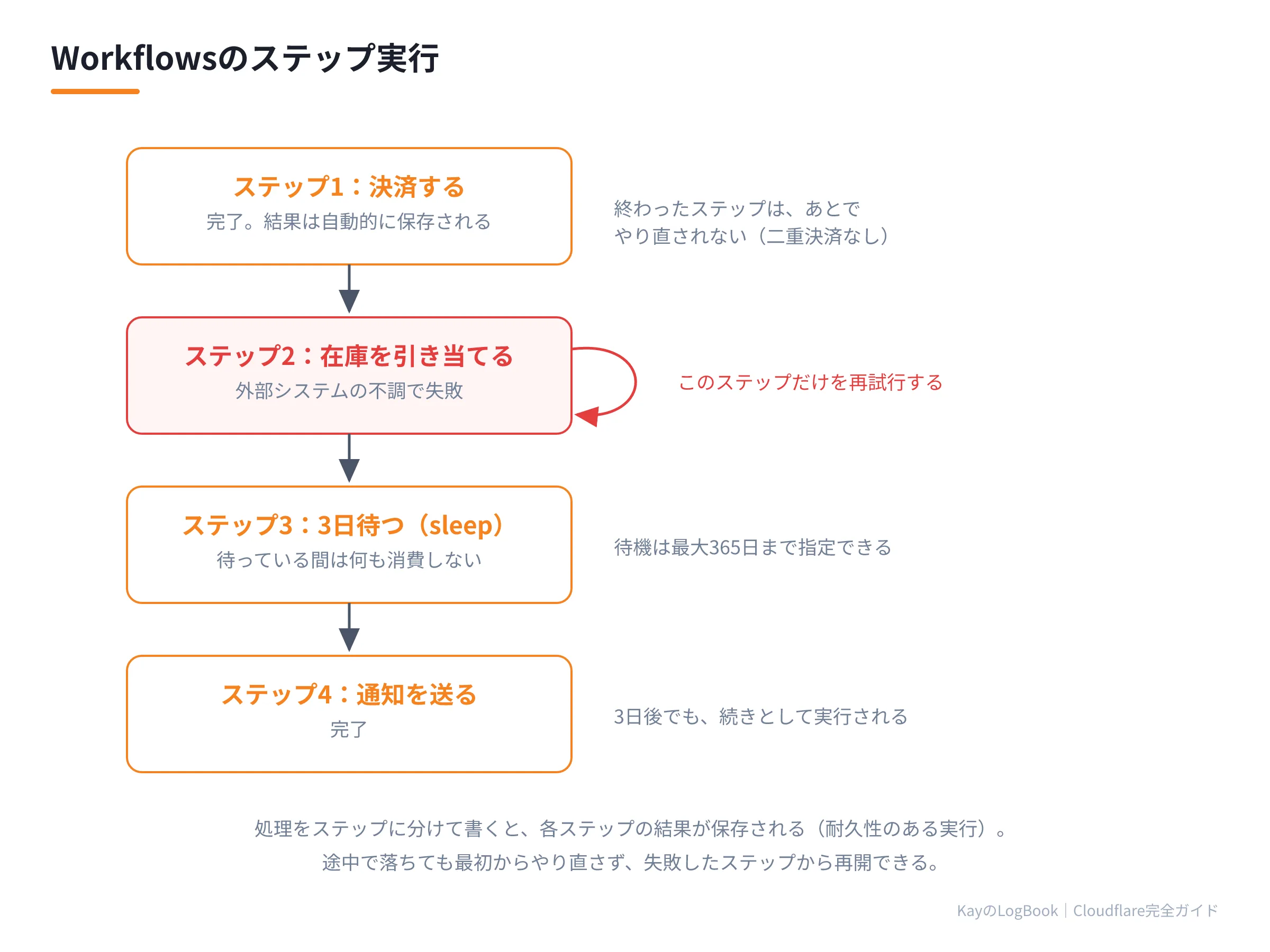
For example, consider the flow “receive order → take payment → allocate stock → request shipping → send completion email.” If the external system is down during stock allocation, Workflows doesn’t start over from payment; it retries only the stock allocation. Accidents like double charges don’t happen.
The other feature is waiting. You can pause processing with sleep, for up to 365 days. And it consumes no resources while waiting. Processes that span time, like “send a follow-up email three days after sign-up” or “run totals on the 1st of next month,” can be written as a single piece of code.
In code, Workflows is also a kind of Worker, developed and deployed with Wrangler.
Choosing between Queues and Workflows#
The two don’t compete; they handle different things.
| Queues | Workflows | |
|---|---|---|
| Good at | Streaming large numbers of small jobs | Completing work with many steps |
| Unit | One message | One series of processing (an instance) |
| State | Essentially none | Keeps each step’s result |
| On failure | Redelivers per message | Resumes from the failed step |
| Long waits | Delayed delivery (relatively short) | Up to 365 days with sleep |
| Typical uses | Log collection, mass notifications, image conversion requests | Order processing, data migration, multi-stage AI processing |
The rule of thumb is: “Does the job finish in one go, or does it have multiple stages that proceed in order?” The former suits Queues; the latter suits Workflows. You can also combine them, starting a workflow from a request received through a queue.
Pricing and main limits#
Queues is available on the free plan too (as of August 2026).
- The paid plan includes 1 million operations per month; beyond that, $0.40 per million operations
- One operation is counted per 64 KB of data. A single message normally takes 3 operations: write, read and delete
- Number of queues: up to 10,000 per account
- Message size: up to 128 KB / per batch: up to 100 messages
- Retention: fixed at 24 hours on the free plan; configurable up to 14 days on paid plans
- Throughput: 5,000 messages per second per queue
Workflows is also available on the free plan.
- Steps: Free 1,024 / Paid 10,000 by default (up to 25,000)
- Concurrent instances: Free 100 / Paid 50,000 (waiting instances don’t count)
- Executions per day: Free 100,000 (shared with Workers) / Paid unlimited
- Stored state: Free 100 MB per instance / Paid 1 GB
- Retention of records after completion: Free 3 days / Paid 30 days
- The cost of execution itself is calculated on the same basis as Workers (CPU time)
Points for beginners to watch#
- It’s not “exactly once”: Queues guarantees delivery, but due to retries the same message may be processed twice. It’s safest to build things so that running twice does no harm (a design where doing the same thing twice doesn’t change the result, known as idempotency)
- Set up a dead letter queue from the start: without a place to move messages that keep failing, investigating causes gets hard
- Split Workflows steps finely: since execution resumes per step, cramming a big job into one step widens the scope of what gets redone
- Step results are saved: each step’s return value is stored, so put large data that exceeds the limit (up to 1 MiB) in R2 or similar, and pass only its location between steps
- The goal is a design that doesn’t make users wait: going asynchronous doesn’t make things faster; it’s a mechanism for structuring things so users aren’t kept waiting. The total amount of processing doesn’t change
Related services#
- Workers: the very runtime for Queues and Workflows (Chapter 5)
- Durable Objects: the coordinator for simultaneous access. Its role differs from asynchronous processing (previous page)
- R2: used alongside as a place to hand off large data (Chapter 6)
- Email Routing: you can also set things up so that mail received by Email Workers is fed into a queue for processing (Chapter 5)
- Workers AI: build time-consuming AI processing in as Workflows steps (Chapter 7)
Summary#
- Asynchronous processing is the idea of reliably finishing heavy work in the background without making users wait
- Queues stands between sender and receiver and holds work for them. It provides batching, automatic retries and dead letter queues
- Workflows manages processing made of multiple steps and can resume from the step that failed (durable execution)
- Workflows can include waits of up to 365 days, so processes spanning days can be written as one piece of code
- Large volumes of one-shot jobs suit Queues; long work that proceeds in order suits Workflows
- Both are available from the free plan, and Queues’ usage-based billing is calculated per operation
The last page of Chapter 5 covers Containers, which extend the Workers runtime itself. They’re an option for processing you can’t write in JavaScript, or when you want to run existing software as is.