What Is a WAF? How Web Applications Are Protected
On this page13 items
On the previous page, you learned about DDoS attacks, which take a service down with massive amounts of traffic. But not all attacks on websites rely on brute “volume.” Some attack with “quality”: a single request that steals the contents of a database or defaces a site. A WAF is what defends against them.
WAF is a basic term that comes up everywhere in web security, not just at Cloudflare. This page explains what a WAF defends against through concrete attack examples, and then looks at how Cloudflare WAF is structured.
What you’ll learn on this page#
- What a WAF (Web Application Firewall) is
- Typical attacks a WAF prevents (SQL injection, XSS and more)
- The difference between a regular firewall and a WAF
- How Cloudflare WAF is structured (managed rules and custom rules)
- Differences by plan, and what beginners should watch out for
What is a WAF?#
Attacks that target applications#
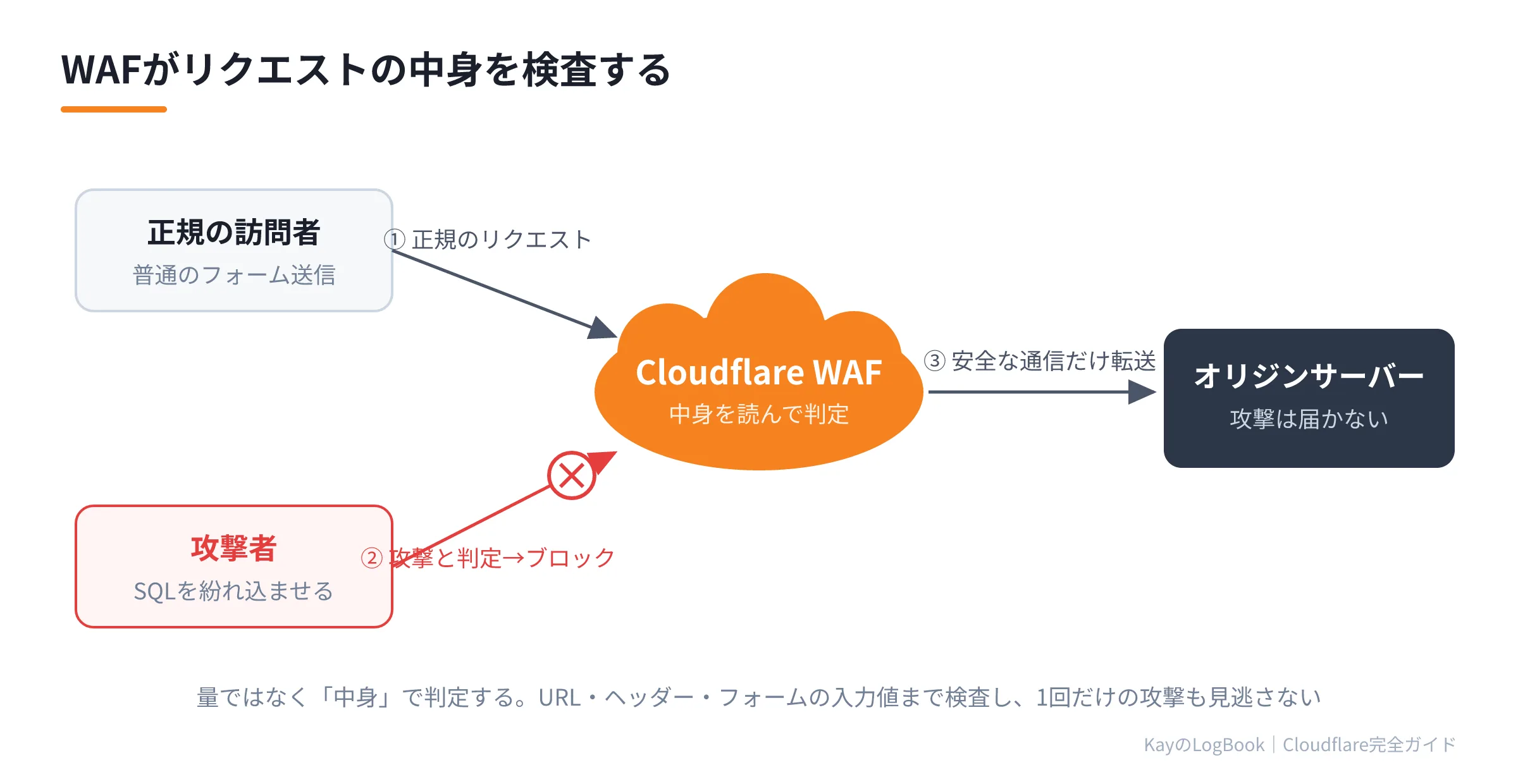
A WAF (Web Application Firewall) inspects the contents of HTTP requests arriving at websites and applications, and blocks requests with the characteristics of an attack.
What are “attacks that target applications”? Let’s look at two typical examples.
SQL injection is an attack that sneaks database commands (SQL) into input fields. For example, if you enter a string like ' OR '1'='1 in the username field of a login screen, a poorly built program interprets it as “the condition is always true,” letting someone log in without a password or extract the entire member database. Many large-scale personal data breaches have used this technique.
XSS (cross-site scripting) is an attack that posts a malicious script (a program that runs in the browser) on a bulletin board or comment section and makes it run in the browsers of other visitors who open that page. It’s used to display fake login screens or steal the information that indicates login state (cookies).
In both cases, a single request is enough, and it looks just like an ordinary form submission. There’s no “abnormal volume” like with DDoS, so monitoring volume can’t detect it. A mechanism that reads the contents and decides “this input is an attack” — that’s a WAF.
How it differs from a regular firewall#
You’ve probably heard the word “firewall” itself. A traditional firewall decides whether to allow traffic by looking at “the address on the envelope,” such as the destination port or source IP address. For example, controls like “close everything except port 443 for the web.”
But as long as you publish a website, you have no choice but to keep port 443 open. Attackers send their attacks through that legitimate entrance, in the form of legitimate HTTP requests. The address on the envelope is perfectly normal, so a traditional firewall lets it straight through. The difference is that a WAF opens the envelope and reads “the contents of the letter” (URL, headers, form input values and so on), inspecting them for attack characteristics.
Why server-side measures alone aren’t enough#
In principle, both SQL injection and XSS can be prevented by building the application correctly. There are still reasons a WAF is needed.
- You can’t be certain there are no oversights in the programs you wrote
- Vulnerabilities (security flaws) in CMSs like WordPress and their plugins are discovered daily, and attacks sometimes begin before a fix is released (zero-day attacks)
- Until you apply the fixed version (update), there’s a period when you’re defenseless
A WAF doesn’t fix the vulnerability itself, but by stopping attacks at a “checkpoint” before they arrive, it buys you time. Getting through the period before a vulnerability fix is available with WAF rules is also called “virtual patching.”
How Cloudflare WAF is structured#
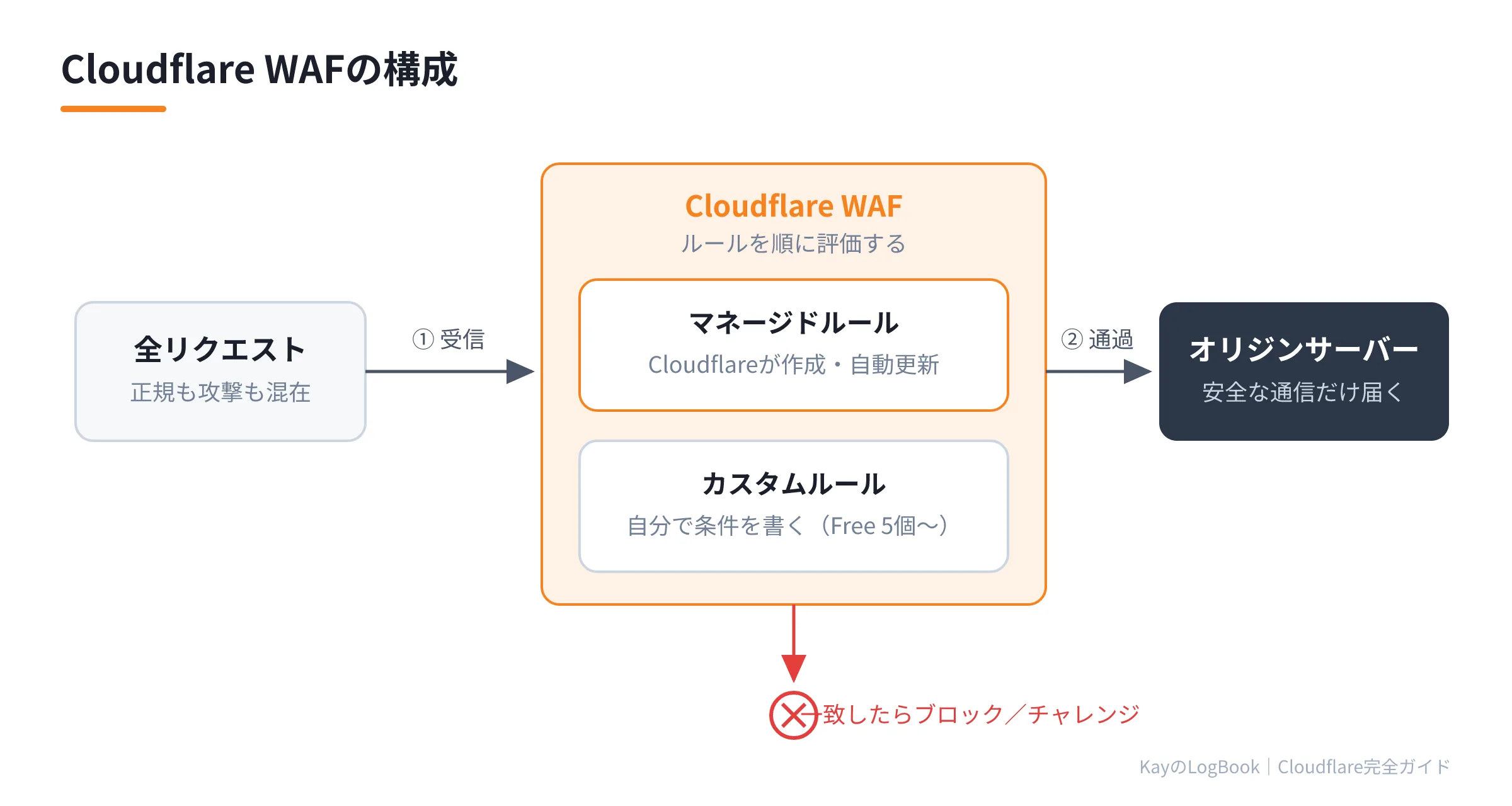
Cloudflare’s WAF works on every request that goes through the proxy (orange cloud). Just like DDoS protection, you don’t need to install any additional software on your server. At its core are the following two kinds of rules.
Managed rules: a defensive rule collection managed by Cloudflare#
Managed Rules are sets of attack-detection rules created and updated by Cloudflare’s specialist team. They reflect the latest attack patterns observed in traffic around the world, and you can use them simply by “turning them on.” Typical rulesets are as follows.
- Cloudflare Managed Ruleset: the flagship ruleset managed by Cloudflare itself. Quick to respond to new vulnerabilities (Pro and above)
- OWASP Core Ruleset: the industry-standard ruleset from OWASP, a web security standards organization, tuned by Cloudflare (Pro and above)
- Cloudflare Free Managed Ruleset: a reduced version applied automatically even on the Free plan. It blocks attacks on high-impact vulnerabilities that have made headlines
Rules addressing attacks on WordPress are also included, which makes them especially valuable to WordPress site operators as “insurance for the period between a plugin vulnerability being found and you updating.”
Custom rules: defensive rules you write yourself#
Custom Rules are rules you write with your own conditions. You build conditions by combining the request’s country, IP address, URL, User-Agent (information indicating the type of browser), HTTP method and so on, and specify the action for matching requests (block, challenge = checking whether it’s a human, skip, or log only).
For example, you can use them like this.
- Block access to the WordPress admin screen (/wp-admin/) from outside your country
- Block specific aggressive User-Agents or request patterns
- Apply a challenge only to POSTs (submissions) from abroad to your contact form’s URL
As seen on the pricing plans page, the custom rule limits are Free 5 / Pro 20 / Business 100 / Enterprise 1,000. Even with 5, you can build a practical defense with some ingenuity.
How the rules work#
When a request reaches Cloudflare, in addition to the DDoS protection checks, custom rules and managed rules are evaluated in order. When a rule matches, the specified action (such as block) is executed immediately, and the request never reaches the origin server. You can check what was blocked and how many times at any time in the dashboard’s Security Events screen. “I looked at the event log the day after setting it up and was shocked by how many attacks were coming in” is a classic story among people who adopt Cloudflare.
Things beginners should watch out for#
- False positives can happen: legitimate operations are sometimes misjudged as attacks and blocked. Long posts and input containing HTML are especially likely to get caught. If there’s a problem, check in Security Events which rule matched, and you can adjust or exclude just that rule
- You can also start by watching the logs: custom rule actions include “log only” (Log; for Enterprise) and challenge. Rather than blocking everything right away, watching with a challenge first is a safe approach
- A WAF isn’t all-powerful: it can inspect contents even if they’re encrypted, but application design mistakes (such as missing permission checks) and unauthorized logins using legitimate credentials can’t be fully stopped by pattern inspection alone. Combining it with bot protection and Rate Limiting (on the following pages) is important
- Keep updating on the server side: a WAF is a checkpoint that buys time, not something that eliminates vulnerabilities. Updating your CMS and plugins remains fundamental
- The orange cloud is a prerequisite: just like DDoS protection, the WAF only works on proxied traffic
Related services#
- DDoS Protection: the mechanism that defends against volume attacks. A pillar of defense alongside the WAF (previous page)
- Rate Limiting: a feature that limits access based on counts. Effective against brute-force attacks (on a later page)
- Bot protection (Bot Fight Mode / Bot Management): identifies and handles automated traffic itself (next page)
Summary#
- A WAF inspects the contents of HTTP requests and blocks attacks that target applications, such as SQL injection and XSS
- While a traditional firewall looks at “the address on the envelope,” a WAF reads “the contents of the letter”
- It’s highly valuable as a “virtual patch” that protects you during the period before a vulnerability fix is available
- Cloudflare WAF has two pillars: managed rules maintained by Cloudflare, and custom rules you write yourself
- Even the Free plan gives you 5 custom rules and the free managed ruleset; Pro and above enable the full rulesets
- False positives can be checked and adjusted in Security Events. Keep updating on the server side even with a WAF