What Is Cloudflare Turnstile? A CAPTCHA Alternative
On this page13 items
“Select all images with traffic lights.” Everyone has had to solve a puzzle like this on a website’s sign-up form or login screen. That’s what’s called a CAPTCHA, a test for telling humans and bots apart.
But honestly, these puzzles are a pain, and sometimes you fail them repeatedly even though you’re human. Cloudflare Turnstile is a CAPTCHA alternative that aims to eliminate the “make them solve a puzzle” experience entirely. It’s free and can be added even to sites that don’t use Cloudflare, which makes it unusual among the features in Chapter 2: it’s a “tool you can use on its own.”
What you’ll learn on this page#
- What a CAPTCHA is and what problems it has been criticized for
- How Turnstile confirms a human without a puzzle
- The flow from token issuance to verification (the big picture of the site-side implementation)
- Pricing, the free tier, and how it differs from reCAPTCHA
- Points for beginners to watch
The role and problems of CAPTCHA#
Why do forms need a “human check”?#
As we saw on the bot protection page two pages back, contact forms, sign-ups and comment sections are prime targets for spam bots. From the server’s point of view, a bot’s submission and a human’s submission are the same POST request, and telling them apart after they arrive is difficult. So you insert a test that confirms the sender is human “before submission.” That’s the role of a CAPTCHA (Completely Automated Public Turing test to tell Computers and Humans Apart).
Three problems with CAPTCHA#
CAPTCHAs have been used for many years, but problems have been pointed out.
- Worse user experience: puzzles are said to take anywhere from ten-odd to about 30 seconds on average, and some users give up partway. On an e-commerce site, that translates directly into lost sales
- Declining effectiveness as AI advances: ironically, thanks to advances in image recognition AI, bots are now becoming better at the puzzles than humans
- Privacy concerns: concerns have been raised that Google’s widely used reCAPTCHA uses information such as cookies in its judgments
In short: “a hassle for humans, getting beaten by bots, and a privacy worry too.” Turnstile, released by Cloudflare in 2022, is the answer to this situation.
How Turnstile works#
Looking at “browser behavior” instead of puzzles#
Turnstile is embedded in a form as a small widget. All the visitor sees is a small box that changes from “Verifying…” to “Success,” and as a rule, no puzzle appears.
Behind the scenes, Turnstile applies the techniques covered on the bot protection page, running multiple non-interactive challenges inside the browser. It checks behaviors any real browser would naturally have, scores suspiciousness with machine learning and so on, all within a few seconds the visitor doesn’t notice, and if it judges the visitor “human-like,” a check mark appears. Even when something looks suspicious, the most it adds is a checkbox click; it never makes you solve an image puzzle.
Token issuance and verification: it takes two stages#
Turnstile works in two stages: “judgment in the browser” and “verification on the server.” This is the key to understanding how to implement Turnstile.
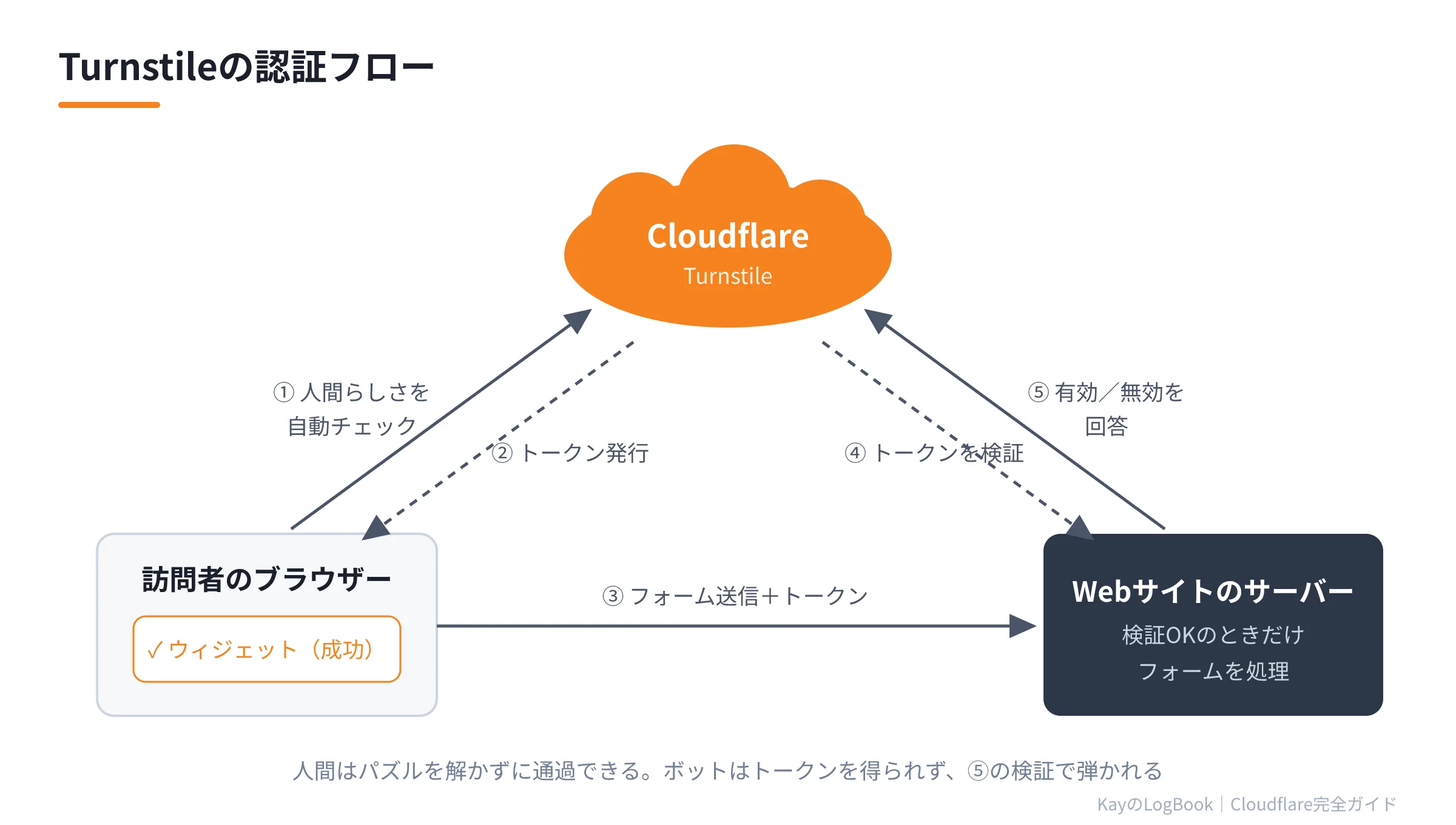
- Place the widget on the form page (using the site key issued for each site)
- When a visitor opens the page, the widget runs automatic checks in the browser
- If it passes, a token (a string that serves as a pass) is issued and sent to the server along with the form submission
- The server sends the token it received to Cloudflare’s verification API (siteverify) to confirm that it’s genuine and hasn’t been reused
- Only when verification passes does the server process the form contents
The key point is step 4. Just placing the widget doesn’t stop bots. Only when the token is verified on the server side does “submissions that haven’t passed Turnstile are rejected” actually hold. On WordPress, the easy route is a plugin that handles this verification for you.
It works on sites outside Cloudflare too#
Since Turnstile needs only the site key and the verification API, it can be added to sites that don’t use Cloudflare’s proxy (the orange cloud). Conversely, the “challenge pages” that WAF and bot protection show on sites behind Cloudflare’s proxy use the same technology as Turnstile internally. While the other features in Chapter 2 protect “traffic that passes through Cloudflare,” Turnstile can be thought of as a tool that protects “a single point: the form.”
Pricing and how it differs from reCAPTCHA#
Turnstile is free to use, with no limit on the number of verifications (challenges) (as of August 2026). The free tier is limited to 20 widgets, 10 hostnames per widget and 7 days of history in analytics; for large-scale use beyond that, there’s an Enterprise version (unlimited widgets, 200 hostnames, removal of branding and so on).
The main differences from reCAPTCHA are as follows.
- Experience: Turnstile has no puzzles as a rule. reCAPTCHA has also had an invisible type in recent years, but image puzzles appear when things look suspicious
- Privacy: Turnstile states that it doesn’t track with cookies and doesn’t use collected data for advertising or similar purposes
- Price: reCAPTCHA becomes paid beyond a certain number of calls (under Google Cloud’s billing). Turnstile is free with unlimited calls
- Ease of adoption: both take one line of script plus server verification, and migrating is mostly a matter of swapping site keys
Points for beginners to watch#
- Don’t skip server-side verification: this is the most common implementation mistake. If you only place the widget for show and don’t verify, everything goes straight through. Follow the plugin or sample implementation and always go as far as verifying with siteverify
- Don’t publish your secret key: two keys are issued, a site key (fine to publish) and a secret key (for server verification, keep private). Never write the secret key into your HTML
- Use the test keys: for development, there are test keys that “always pass” and “always fail.” Use them before you struggle with testing on production keys
- It’s not a cure-all: Turnstile protects only the forms where you place it. Site-wide defense is the job of WAF, bot protection and Rate Limiting, and only by combining them do you get layers
- Cases where legitimate users fail: very old browsers or unusual environments can sometimes fail verification. It’s reassuring to provide more than one way to contact you
Related services#
- Bot protection (Bot Fight Mode, etc.): identifies automated access across the whole site. A relative of Turnstile’s detection technology
- Rate Limiting: limits the number of attempts on forms and logins. Effective when layered with Turnstile
- WAF: Turnstile’s technology is used for the challenge action’s page
- Email Routing: like Turnstile, a practical service you can use on its own. Sometimes combined with email notifications from forms (Chapter 5)
Summary#
- CAPTCHA is a test to tell humans from bots, but it had problems: “a hassle for humans, increasingly beaten by bots, and privacy concerns”
- Turnstile is a CAPTCHA alternative that judges human-likeness with automatic checks in the browser instead of puzzles
- It works in two stages: the browser gets a token, and the server confirms it with the verification API. Without server-side verification it doesn’t work
- It’s free with unlimited verifications and can be added to sites that don’t use Cloudflare
- It protects only the forms where it’s placed. Combine it with WAF, bot protection and Rate Limiting to build layers