Cloudflare Pricing Plans Explained (Free/Pro/Business/Enterprise)
On this page18 items
This is the final page of Chapter 1. So far we’ve looked at the mechanisms that form Cloudflare’s foundation: DNS, domains, CDN, proxying and SSL/TLS. Each time, the phrase “available even on the free plan” came up. So what changes on a paid plan, and how much does it cost?
Cloudflare’s pricing is clear once you’re used to it, but at first glance the big picture is hard to grasp. That’s because it combines a vertical axis of plans (Free/Pro/Business/Enterprise) with a horizontal axis of add-ons and usage-based billing. This page lays out that overall structure. Many individual features haven’t been introduced yet, so the goal here is to get a “map” in your head; after learning the detailed features in each chapter, we’ll revisit this practically in “Choosing a Plan” in Chapter 9.
What you’ll learn on this page#
- The basic structure of Cloudflare pricing (plan + add-ons + usage-based billing)
- The idea of billing “per domain” (what a zone is)
- The differences and prices of the four plans: Free, Pro, Business and Enterprise
- How far you can get on the free plan
- Points beginners should watch out for when thinking about cost
The basic structure of pricing#
Think of it as three floors#
Cloudflare’s pricing is easiest to sort out if you think of it as a three-story building.
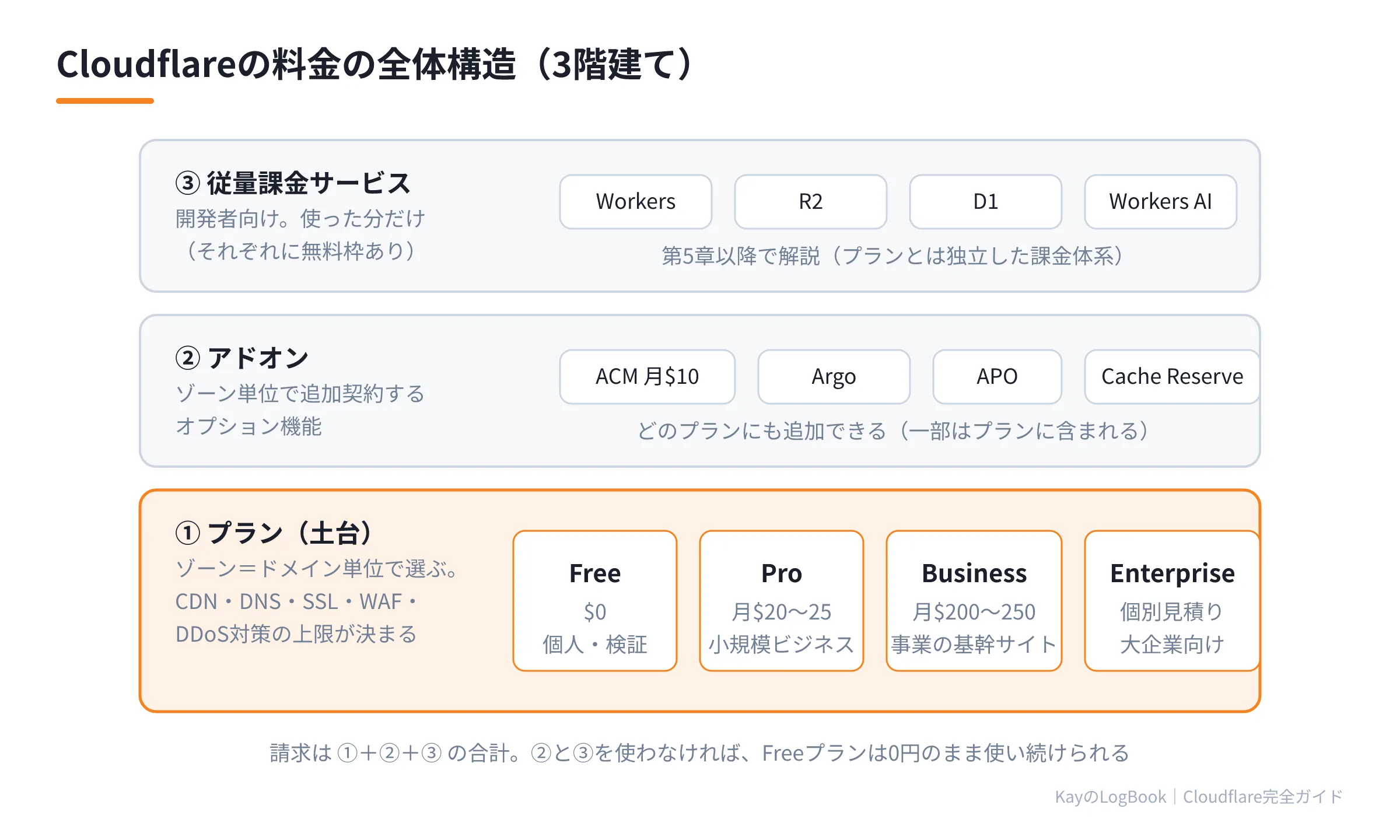
- Plan: The base subscription you choose for each domain (Free/Pro/Business/Enterprise). The plan determines the performance and limits of the core features we’ve covered so far: CDN, DNS, SSL, WAF and DDoS protection
- Add-ons: Options you subscribe to on top of a plan. Advanced Certificate Manager ($10/month), Argo Smart Routing and APO, which appeared on earlier pages, fall into this category
- Usage-based services: The developer services covered from Chapter 5 onward, such as Workers and R2. They use a pay-for-what-you-use model independent of the plan, and each has a free tier
When people hear “Cloudflare pricing,” they picture floor 1, the plan, but your actual bill is the sum of 1 + 2 + 3. Put the other way around, if you don’t use 2 and 3, Cloudflare on the Free plan truly costs $0, indefinitely.
The billing unit is the “zone” = a domain#
Plans are subscribed per zone, not per account. A zone is the management unit for one registered domain added to Cloudflare: “kaylog.io” is one zone, and adding “example.com” makes another. Subdomains (such as blog.kaylog.io) are part of the same zone, so they cost nothing extra.
That means you can choose a different plan for each domain, like “kaylog.io on Pro, example.com on Free.” It also means that if you put several domains on paid plans, the cost multiplies accordingly.
The four plans#
Prices and positioning#
Prices as of August 2026 are as follows (in US dollars; the unit price differs between monthly and annual billing).
| Plan | Monthly (billed annually) | Monthly (billed monthly) | Positioning |
|---|---|---|---|
| Free | $0 | $0 | Personal sites, blogs, testing |
| Pro | $20 | $25 | Personal sites with revenue, small businesses |
| Business | $200 | $250 | Websites central to a business |
| Enterprise | Custom quote | Custom quote | Large enterprises, mission-critical uses |
Free: free, but not a “trial version”#
Cloudflare’s Free plan isn’t a feature-limited trial; it’s a permanent plan you can run production sites on. In terms of the features covered in the chapters so far, all of the following are included for free.
- Authoritative DNS (fast, with DNSSEC support)
- CDN (unlimited bandwidth, no data transfer charges)
- Unlimited DDoS protection (no extra charges based on attack size)
- Automatic HTTPS with Universal SSL
- WAF (5 custom rules and the free managed ruleset)
“An unusually generous free tier” is Cloudflare’s defining feature, and in practice a personal blog or a self-hosted home server can often run entirely on the Free plan.
Pro: adds features to “polish” your site#
What Pro adds is mainly optimization and analytics.
- The full WAF managed ruleset (a complete set of Cloudflare-managed attack protection rules; covered in detail in Chapter 2)
- Automatic image compression and optimization (Polish) and mobile acceleration (Mirage)
- APO, which safely caches HTML for WordPress sites
- More detailed analytics
- 20 WAF custom rules; the upload limit stays at 100MB
Business: meets the requirements of business use#
With the Business plan, the star isn’t the features themselves but “the requirements for using it in a business.”
- A 100% uptime SLA (service level agreement, with refunds proportional to downtime)
- Support with uptime guarantees (priority chat and email)
- Bringing your own custom certificates and support for PCI DSS compliance
- 100 WAF custom rules, 200MB upload limit
Enterprise: custom performance, support and contracts#
Enterprise is an individual contract with no list price. It adds elements for large organizations, such as a dedicated account team, 24/7 phone support, exporting access logs (Logpush), higher upload limits and stronger bot protection. It’s generally said to start at several thousand dollars a month. Few readers of this guide will sign up right away, but knowing that “this world exists at the top” makes labels like “Enterprise only” on feature pages easier to understand.
Key limits that change by plan#
Here’s a summary of the differences by plan, limited to items that have appeared in the chapters so far (as of August 2026).
| Item | Free | Pro | Business | Enterprise |
|---|---|---|---|---|
| CDN bandwidth | Unlimited | Unlimited | Unlimited | Unlimited |
| DDoS protection | Unlimited | Unlimited | Unlimited | Unlimited |
| Universal SSL | ○ | ○ | ○ | ○ |
| WAF custom rules | 5 | 20 | 100 | 1,000 |
| Upload limit | 100MB | 100MB | 200MB | 500MB+ (expandable) |
| Image optimization (Polish, etc.) | − | ○ | ○ | ○ |
| Uptime SLA | − | − | 100% (refunds) | 100% (enhanced guarantees) |
| Support | Community | Priority (chat, etc.) | Dedicated, 24/7 |
Note that CDN bandwidth and DDoS protection are unlimited on every plan. The philosophy that the very things other providers tend to charge by usage are free is what characterizes Cloudflare’s pricing.
Add-ons and usage-based billing: outside the plan#
Add-ons (per-zone options)#
These are the main options you can add regardless of plan. All of them have shown up on earlier pages.
- Advanced Certificate Manager: $10/month. Certificates for deeply nested subdomains, among other things (see the SSL/TLS page)
- Argo Smart Routing: $5/month plus usage-based transfer charges. Route optimization (see the CDN page)
- APO: $5/month (included at no extra cost on Pro and above). WordPress acceleration
- Cache Reserve: Usage-based billing by storage and operations. Long-term cache storage
Usage-based services (for developers)#
Workers, R2, D1, Workers AI and the other services covered from Chapter 5 onward are billed by usage, separately from the plan. Each has its own free tier, and you pay only for what goes beyond it. At this stage, it’s enough to think of the division of roles as “the plan covers protecting and delivering websites; usage-based billing covers the runtime for building apps.”
Points beginners should watch out for#
- Start on Free and upgrade only when you hit a wall: Cloudflare’s Free plan doesn’t push you hard to upgrade, and when you run short of features you can upgrade just that zone. There’s no need to sign up for Pro from the start
- Billing is in US dollars: As mentioned on the domains page, you’re charged in dollars by card. The amount in yen changes with the exchange rate
- Monthly vs. annual billing: Pro and Business are 20% cheaper per month when billed annually. For sites you know you’ll keep running, annual billing is the better deal
- Don’t forget it’s per zone: Add more domains and paid plans cost that much more per domain. For people running multiple sites, the trick is narrowing down “which domains actually need paid features”
- Upgrading doesn’t always solve the problem: For example, upload limits beyond 500MB or longer timeouts are Enterprise territory, and protocols other than HTTP are handled by Spectrum, not by your plan. It’s important to work out “whether the problem is about the plan or about a different service”
Related services#
- Developer services such as Workers / R2 / D1: A usage-based billing system separate from plans. Covered in Chapters 5 and 6
- Zero Trust (Cloudflare One): A suite of products for internal access control. This is also billed separately from plans (per user, with a free tier for up to 50 users), and is covered in Chapter 3
Summary#
- Cloudflare pricing has three floors: “plan + add-ons + usage-based billing”
- Plans are subscribed per zone (registered domain), and you can choose a different plan for each domain
- Four tiers: Free / Pro ($20–25/month) / Business ($200–250/month) / Enterprise (custom quote)
- CDN bandwidth and DDoS protection are unlimited on every plan. Free is a permanent plan fit for production
- The main differences: Pro adds optimization and analytics, Business adds business requirements like SLA and support, and Enterprise is custom
- If in doubt, start on Free and upgrade only the zones that need it